

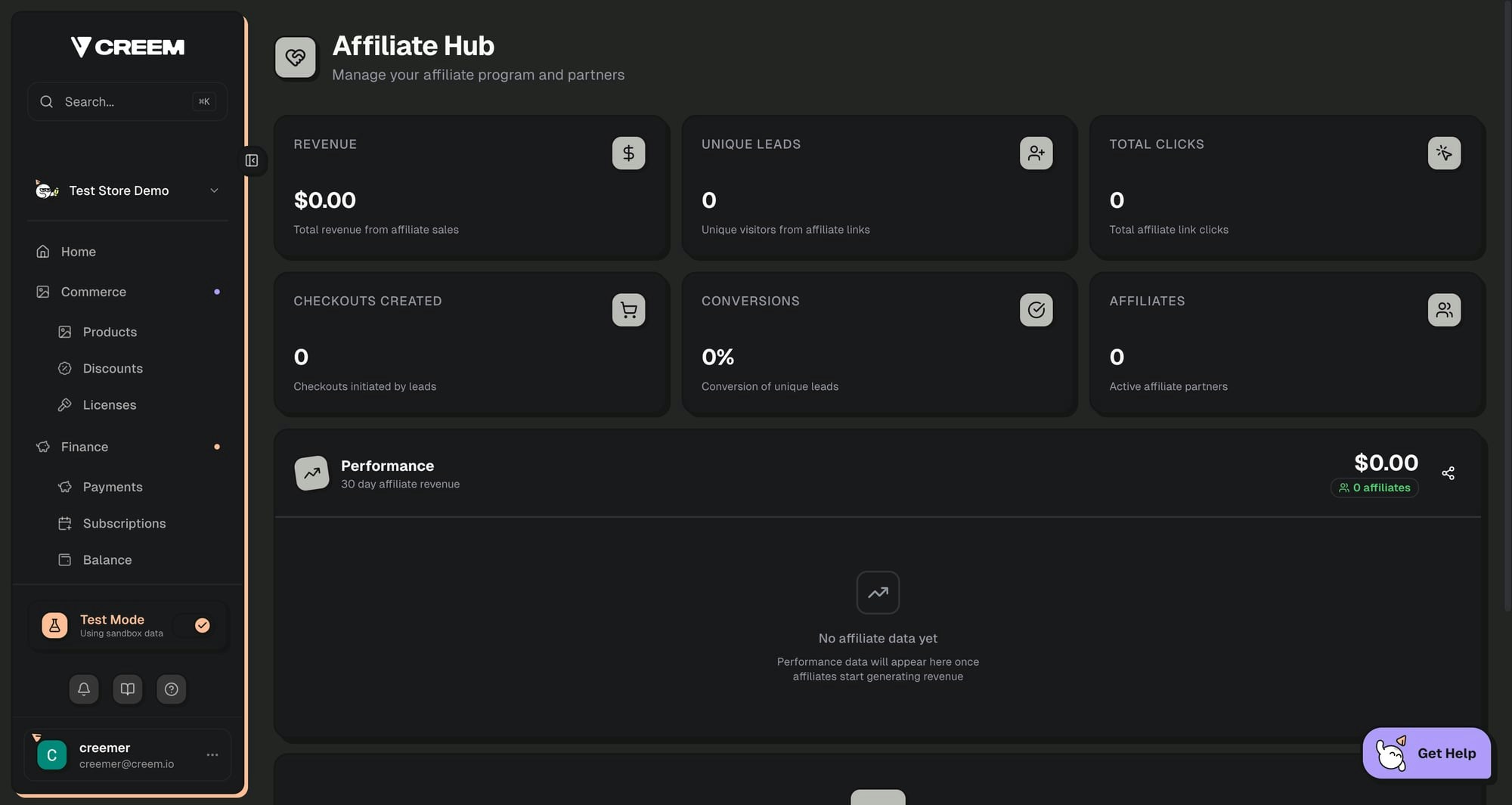
Key Features
For Merchants
Create affiliate programs, invite partners, set commission rates, and track revenue from affiliate referrals
For Affiliates
Join programs, get unique referral links, track earnings in real-time, and request payouts
Automated Tracking
Attribution automatically credits affiliates for referred sales
Compliant Payouts
Built-in KYC verification and multiple payout methods (bank transfer, crypto)
How It Works
The affiliate platform consists of two parts:For Merchants
Creating an Affiliate Program
Navigate to your Creem dashboard and access the Affiliate Hub under the Growth section.1
Open Affiliate Hub
Go to Growth → Affiliate Hub in your dashboard sidebar. If this is your first time, you’ll see the program creation wizard.
2
Enter Program Details
Fill in your program information: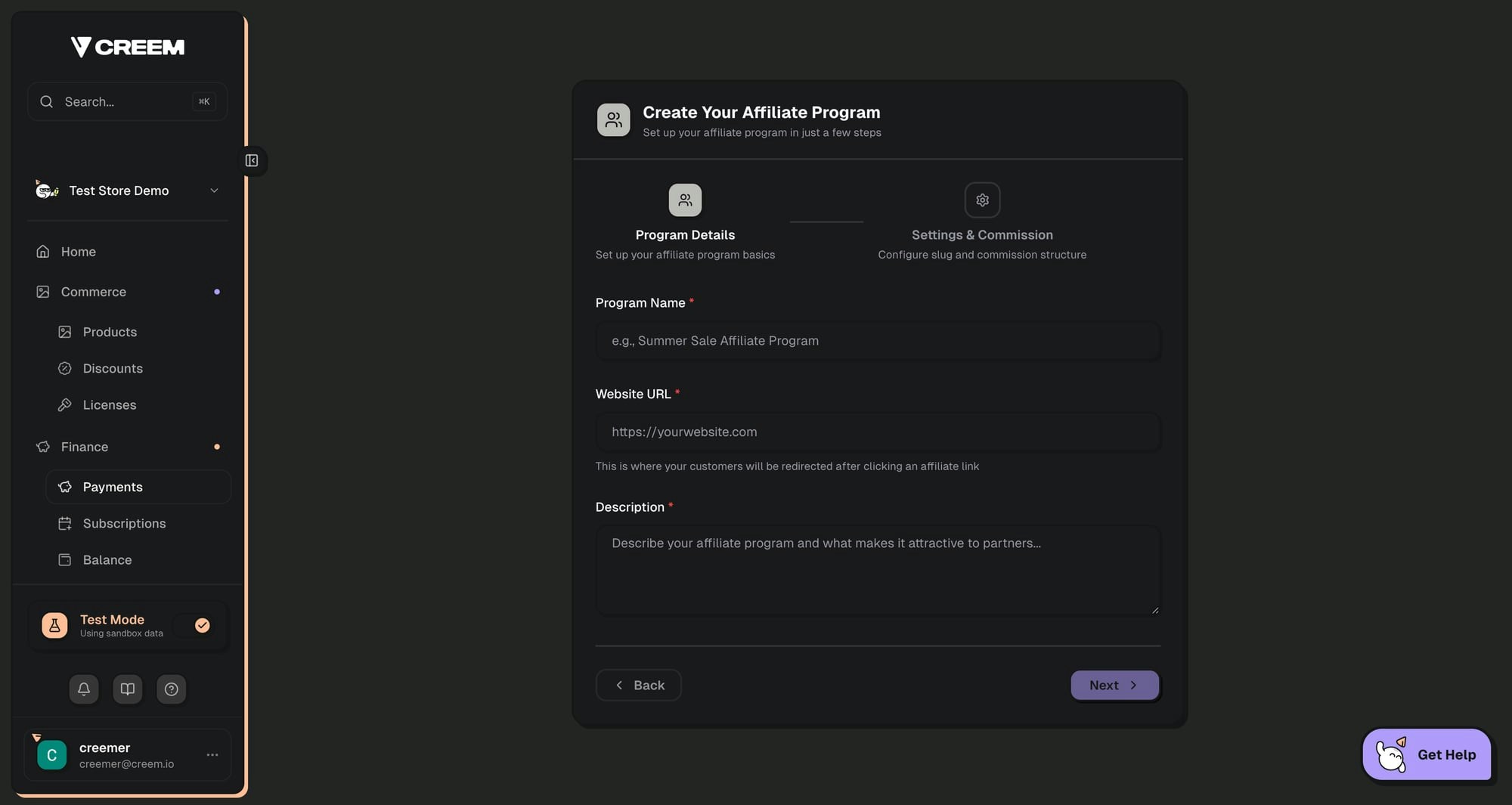
- Program Name: A descriptive name for your affiliate program
- Website URL: Where affiliate links should redirect (your landing page)
- Description: What affiliates should know about your program
3
Configure Commission Settings
Set up your program’s commission structure: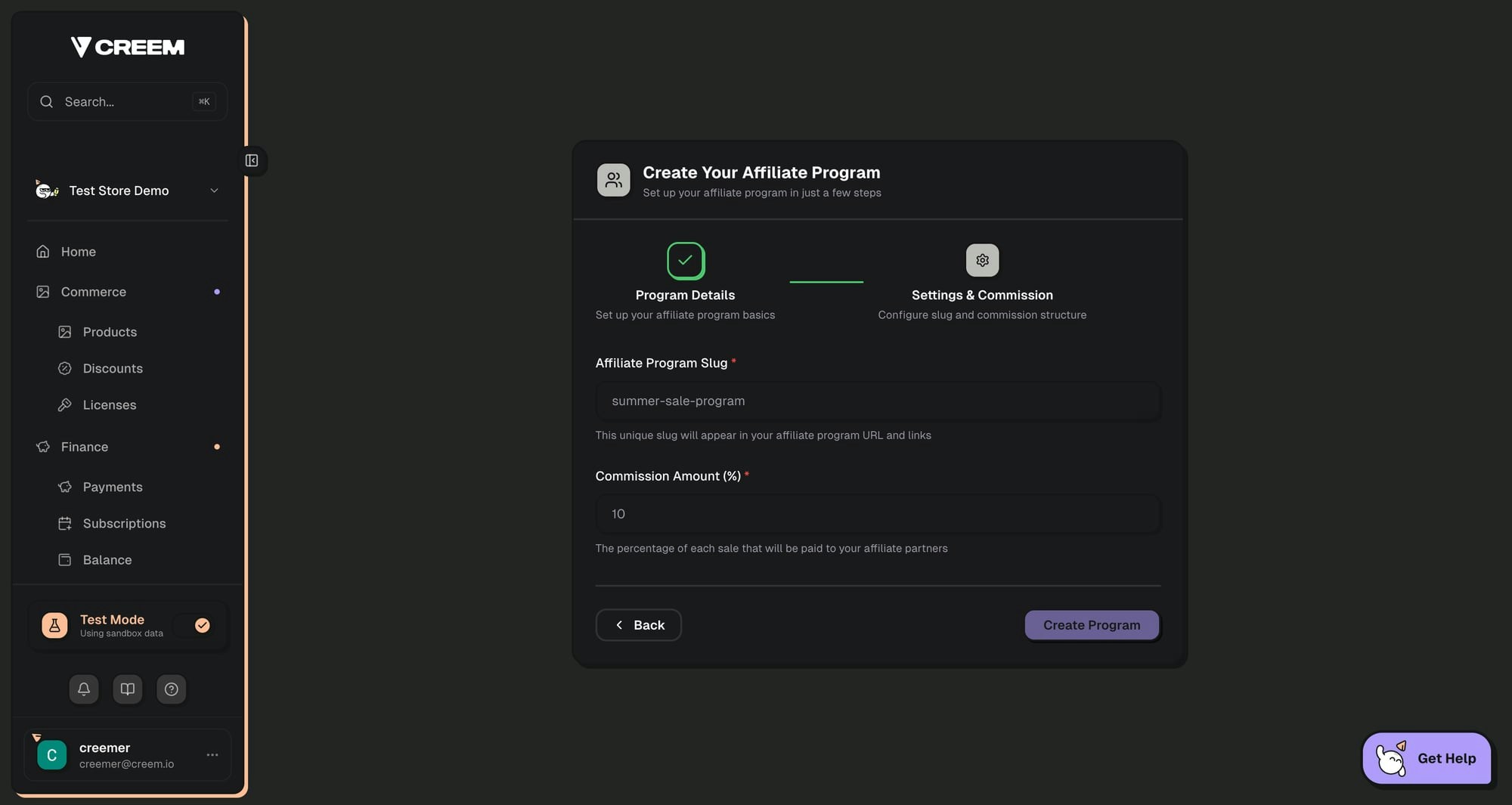
- Program Slug: A unique URL identifier (e.g.,
my-programcreates links like?ref=my-program) - Commission Rate: Percentage of each sale paid to affiliates (0-100%)
4
Start Inviting Affiliates
Once your program is created, you can start inviting partners from the Affiliate Hub dashboard.
Inviting Affiliates
Click Invite Partner from the Affiliate Hub to send invitations to potential affiliates.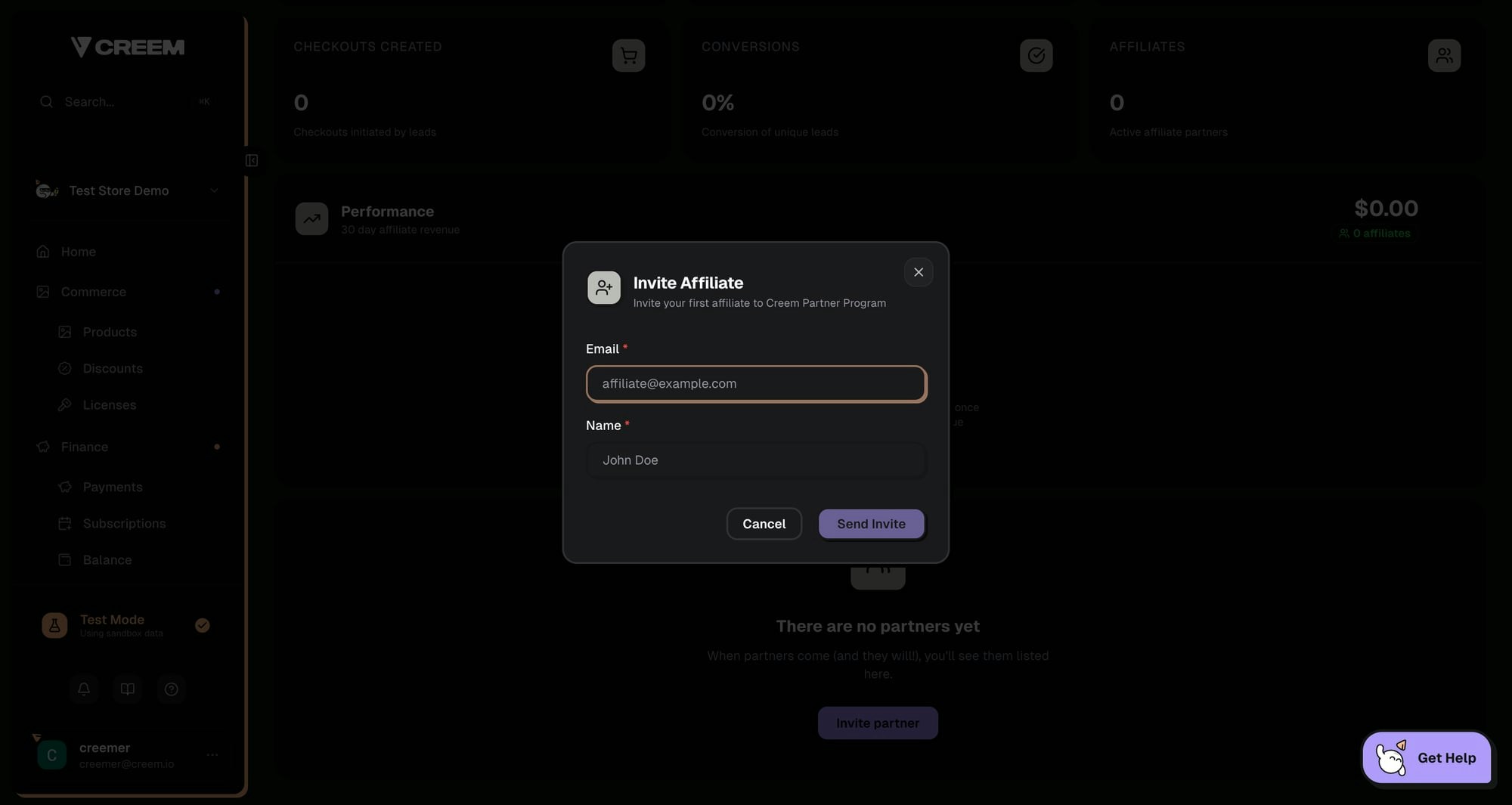
- Enter their email address
- Enter their name
- Click Send Invite
Tracking Performance
The Affiliate Hub provides comprehensive analytics for your program:Partners List
The Partners list shows each affiliate in your program and their current performance at a glance:Limitations
At this time, managing individual partners is not supported, including deleting pending affiliate invitations, setting per-affiliate commission rates, or configuring per-affiliate product restrictions. Want this workflow? Upvote and follow the Manage affiliate partners feature request to get updates if it is implemented.For Affiliates
Joining a Program
When a merchant invites you to their affiliate program, you’ll receive an email with an invitation link.1
Sign In
Visit 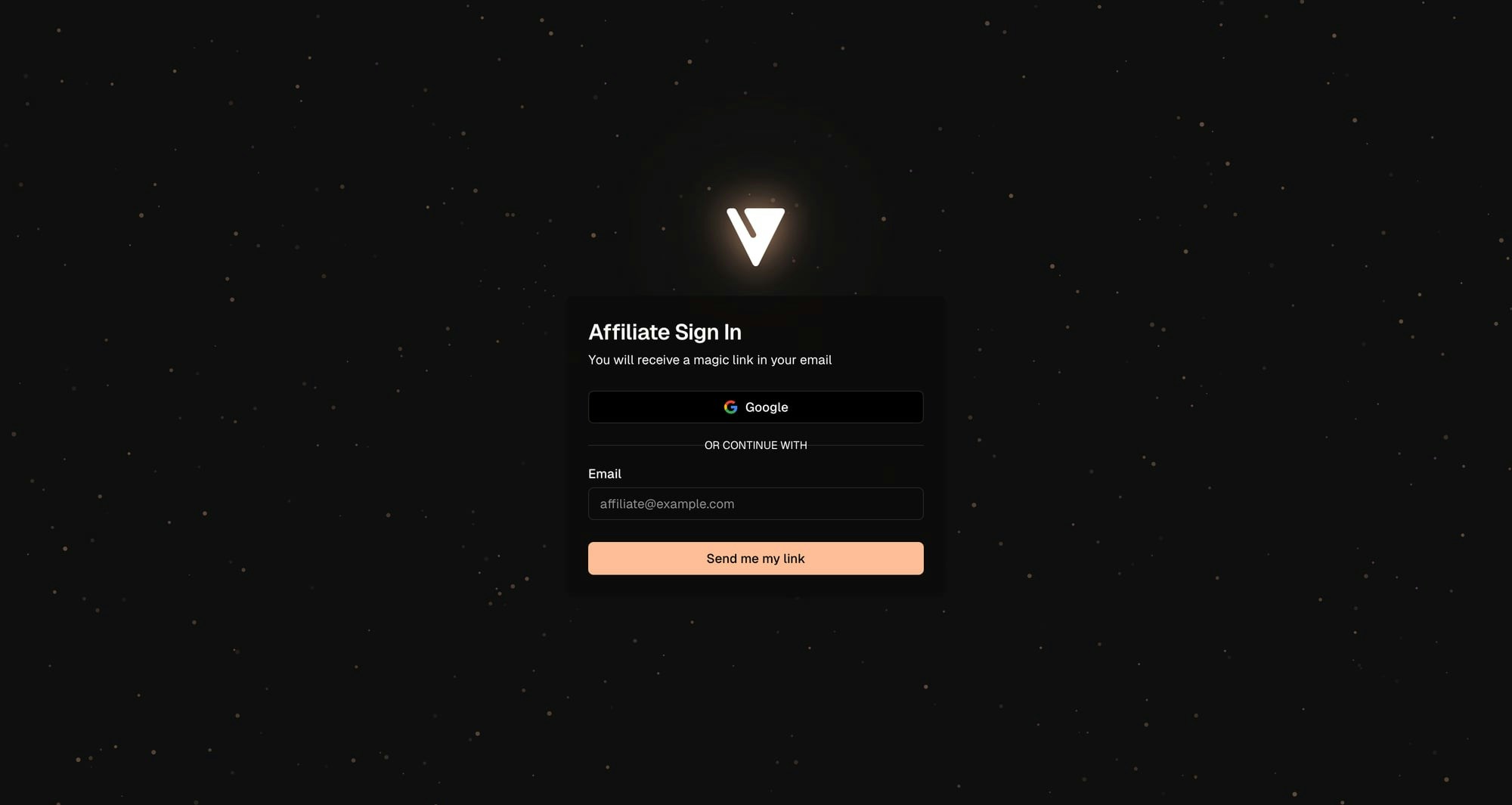
affiliates.creem.io and sign in using the email address the invitation was sent to. You can use Google sign-in or a magic link.2
Accept the Invite
Click the invitation link from your email. Review the program details and click Join Program to accept.
3
Complete Your Profile
First-time affiliates will be prompted to complete their profile:
- Display Name: How merchants will see you
- Bio: A brief description of yourself/your platform
- Website: Your website or landing page (optional)
- Social Links: Your social media profiles (optional)
Your Affiliate Dashboard
After joining a program, your dashboard shows:- Your Referral Link: Copy and share this unique URL to earn commissions
- Revenue: Total commissions earned
- Customers: Number of customers referred
- Clicks: Total clicks on your affiliate links
- Conversion Rate: Percentage of clicks that result in sales
- Commission Chart: 30-day visual breakdown of your earnings
Sharing Your Referral Link
Your unique referral link is displayed on your dashboard. When someone clicks your link:- A tracking cookie is set on their browser
- If they make a purchase within the cookie duration, you earn commission
- The sale appears in your dashboard automatically
Tracking Earnings
View your earnings breakdown on the Balance page:Requesting Payouts
Navigate to the Payouts page to withdraw your earnings. Before requesting payouts, you must complete verification:Identity Verification (KYC)
Identity Verification (KYC)
Complete identity verification through Sumsub. This requires a government-issued ID and a selfie. Verification typically completes within 24 hours.
Payout Method Setup
Payout Method Setup
Choose your preferred payout method:
- Bank Transfer: Add your bank account details via Paysway
- Cryptocurrency: Set up USDC payouts via Mural
Payout Schedule and Thresholds
Affiliate payouts follow the same schedule as merchant payouts:Only commissions that have cleared the hold period by the payout date will be included. For example, if your payout is scheduled for the 15th, only commissions from sales processed before approximately the 8th will be available for that payout.
Payout Methods and Fees
If your bank account currency differs from the commission currency, a conversion fee may be applied by the payment provider. This is outside of Creem’s control.
Managing Your Profile
Update your profile information on the Profile page:- Email: Your account email (read-only)
- Display Name: How you appear to merchants
- Bio: Describe yourself and your promotional methods (max 1,000 characters)
- Website: Your primary website or landing page
- Social Links: Add links to your social media profiles
Multiple Program Memberships
If you’re an affiliate for multiple merchants, you can switch between programs using the membership switcher in the sidebar footer. Each program has its own stats, balance, and payout settings.Configuration Options
Program Settings
Frequently Asked Questions
When do I get paid?
When do I get paid?
Payouts are processed on the 1st and 15th of each month. You must reach a minimum balance of 50 USD/EUR, complete identity verification (KYC), and set up a payout method before requesting a withdrawal. Once you click Withdraw, your payout is queued for the next available window. Note that commissions have a 7–12 day hold period before they become available.
Can I promote multiple merchants?
Can I promote multiple merchants?
Yes! You can join multiple affiliate programs and manage them all from your affiliate portal. Use the membership switcher to view stats and earnings for each program.
What commission rates are typical?
What commission rates are typical?
Commission rates vary by merchant and product type. Software and digital products often offer 20-50% commissions, while physical products typically range from 5-20%.
How is my referral tracked?
How is my referral tracked?
When someone clicks your affiliate link, a cookie is stored in their browser. This cookie attributes any purchases to you within the cookie duration period.
Does attribution work with embedded checkout?
Does attribution work with embedded checkout?
Yes. When a merchant embeds the Creem checkout in their own site, the affiliate cookie isn’t available inside the cross-site iframe (no browser sends it there) — so Creem carries attribution as a signed URL token (
creem_ref) that the embed forwards automatically. Merchants don’t need to wire anything for the common case. See Embedded checkout → Affiliate attribution.Can I see which products are selling?
Can I see which products are selling?
Yes, your dashboard shows conversion data. Merchants may also provide additional reporting on which products drive the most affiliate sales.
What payout methods are available?
What payout methods are available?
Affiliates can receive payouts via bank transfer (processed through Paysway) or cryptocurrency (USDC via Mural). Set up your preferred method in the Payouts section.
Is there a minimum payout amount?
Is there a minimum payout amount?
Yes, you need a minimum available balance of 50 USD or 50 EUR to request a withdrawal. Once you reach this threshold, the Withdraw button becomes available on your Balance page.
Related Features
Revenue Splits
Automatically distribute revenue between co-founders and partners
Discount Codes
Create promotional codes for affiliates to share with their audience
Webhooks
Get notified of affiliate sales in real-time via webhooks
Affonso Integration
Alternative: Use Affonso for external affiliate tracking
Rekomi Integration
Alternative: Use Rekomi for external affiliate tracking and payouts
Need help with your affiliate program? Contact us or join our Discord community.