

Before you can accept payments through Creem, your store needs to pass our account review. Here’s everything you need to know to get approved on the first try.Documentation Index
Fetch the complete documentation index at: https://docs.creem.io/llms.txt
Use this file to discover all available pages before exploring further.
| Requirement | Details |
|---|---|
| Product is live | Your product is ready for production. Still building? Use Test Mode first |
| No false information | No fake reviews, testimonials, or inflated user/customer counts on your website |
| Privacy Policy & Terms of Service | Both legal pages must be present and accessible on your website |
| Product clearly visible | We must be able to understand what you’re selling from your website or landing page |
| No trademark conflicts | Your product name doesn’t infringe existing trademarks or cause consumer confusion |
| Pricing is visible | Pricing is clearly displayed and easy for users to find |
| Acceptable use | No high-risk, shady, or illegitimate use cases — you’re proud of what you’re building |
| Customer support email | Reachable support email is set up and shown on receipts |
| Moderation API | AI image/video generation products must integrate the CREEM Moderation API |
| Not on prohibited list | Your product is not in our prohibited product list |
The Review Process
How long does the review take?
Account reviews are typically completed within 24-48 hours. During peak periods, it may take up to 72 hours. You’ll receive an email notification once the review is complete or if changes are requested. If changes are requested, address them and request a re-review using the Request Re-Review button on the Payout Account page in your dashboard — your account will be re-reviewed promptly.Common reasons for requests for changes
The most frequent issues that cause requests for changes during account review:- Support email mismatch — The email in your Business Details doesn’t match what’s on your website. Update it in Settings → Business Details.
- Website not accessible — Your site is down, password-protected, or returning errors during our review.
- Missing legal pages — Your website needs a Privacy Policy and Terms of Service.
- False information — Fake reviews, testimonials, or inflated user counts on your website.
- Product not ready — If your product isn’t live yet, use Test Mode until it’s ready.
Why do you need to review my account?
We review accounts to ensure that they are legitimate and in compliance with our terms of service. This helps us prevent fraud, misuse, malicious activities, and high-risk accounts.How to submit an account review, and what information is needed?
To submit an account review, you need to navigate to the Account tab Located in the Balance Menu. Click ‘Set up Payout Account’ to start the process of submitting your details and getting your store reviewed.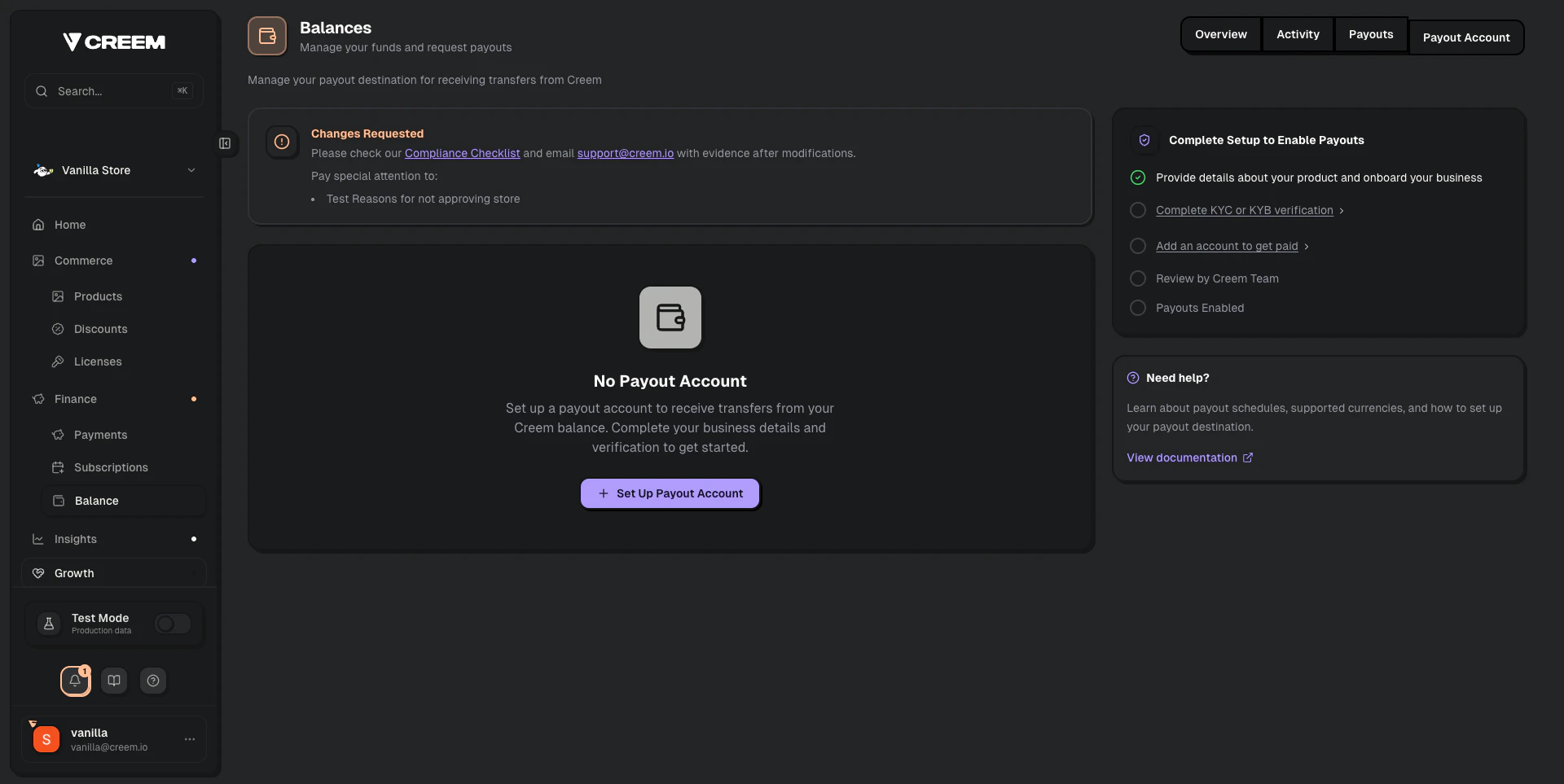
- Your full individual name and/or your business entity name
- Your store/product name
- The product URL of your store
- A description of your business and how you operate
- A description of the products you are intending to sell through Creem with your store
- The country you are a tax resident in (Country of citizenship if an individual store account, or country of incorporation if a business entity)
How to ensure that your account review is successful?
Provide accurate, detailed information about your store and products. The more clearly you describe what you’re selling and how it works, the faster we can approve you. Every application is reviewed for deceptive content. The following will get your application rejected:- Unearned badges (e.g. Product Hunt, “As Seen On”)
- Fake customer testimonials
- Misleading reviews or inflated user counts
Product Guidelines
Acceptable Products
Examples of products we support
Examples of products we support
We allow selling of digital goods that can be fulfilled through Creem. Some examples:
- Software & SaaS
- eBooks
- PDFs
- Design assets
- Photos
- Audio
- Video
Prohibited Products
Full list of prohibited products
Full list of prohibited products
The following products and services are prohibited on Creem:
- Sexually-oriented or pornographic content of any kind, including AI-generated content and NSFW chatbots
- Face-swap, deepfake, and face-manipulation tools and services of any kind
- IPTV services
- Physical goods of any kind
- Spyware or parental control apps
- Donations or charity giving where no product exists or where the price is greater than the product value
- Products or content for which you do not hold a proper license or intellectual property rights
- Third-party content downloaders and rippers that violate platform Terms of Service (e.g. video downloaders, audio rippers, stream recorders). Tools that only process user-owned content or use official APIs are not affected.
- Marketplaces — where you use your Creem store to “partner” to sell others’ products
- Dating sites
- Private Label Rights (PLR) products or Master Resell Products (MRR) — products you’ve obtained a license to sell but do not hold the original IP rights
- Counterfeit goods
- Illegal or age-restricted products such as: drugs and paraphernalia, alcohol, tobacco, vaping products
- Regulated products such as: CBD, gambling, weapons, ammunition, pay-to-play auctions, sweepstakes, lotteries, business-in-a-box, work-from-home, get-rich-quick schemes, etc.
- Regulated services such as: real estate, mortgage, lending, telemarketing, cellular/communication, door-to-door sales, bankruptcy, legal, merchant, debt-relief, collections, banking/financing, currency exchange, warranties, etc.
- Timeshares
- Pharmacies, pharmaceuticals and nutraceuticals
- Homework/Essay mills
- Multi-level marketing, pyramid, or IBO schemes
- NFT & Crypto assets products
- In-game items, currencies, and virtual goods tied to third-party games
- Any other products that our providers and partners deem too risky
Restricted Products
Products subject to strict due diligence
Products subject to strict due diligence
These services are not guaranteed to be accepted:
- Services of any kind (including marketing, design, web development, consulting or other related services)
- Job boards
- Advertising in newsletters, on websites, or in social media posts
Customer Experience and Support
Providing excellent customer support is a core requirement for all merchants on Creem.Support Channels
- A visible support email is mandatory. This email must be accessible on your public website and within the user dashboard.
- Use a branded support email. If your product is
MintAI, your support email should besupport@mintai.com, not a generic address.
Subscription Management
- Users must be able to cancel subscriptions directly from your product. You can achieve this by integrating with the
Creem Cancel Subscription APIor by redirecting users to theCreem Customer Portal.
Refund Policy
Timely customer resolution is critical.- Respond to customer requests within 3 business days.
- If you do not respond within this timeframe, Creem reserves the right to issue a refund on your behalf to ensure customer satisfaction.
AI Wrapper Compliance
To ensure a fair and transparent ecosystem for both merchants and customers, Creem has established a set of compliance requirements for all AI wrapper products. These are platforms that provide a custom interface or extended features for third-party AI models like VEO3, Claude, or Gemini.Product Branding and Naming
Your product’s brand identity must be distinct from the underlying AI models it uses. This is crucial for trademark protection and to avoid customer confusion.Prohibited Practices
- Do not use AI model brand names in your product name. For example, names like “VEO3Studio” or “GeminiVideo” are not allowed.
Required Practices
- Develop independent branding. Choose a name that is unique and does not directly reference the AI models. Examples of compliant names include
MintAI,RenderZen, orSlateVidAI. - You may mention supported models within your application or on your website, but not as part of the core product branding. For instance, you can say “Powered by VEO3” or “Integrates with Gemini.”
- SEO-focused domains are permitted with a redirect. You can use a domain like
veo3generator.comfor SEO, but it must redirect to your properly branded product website.
Marketing and Transparency
When marketing your product, it’s essential to be transparent about its nature and your relationship with the AI model providers.Disclaimers
- If you use model names in advertisements or marketing content, you must include a disclaimer stating that your product is not affiliated with, endorsed by, or sponsored by the model creators.
- Example Disclaimer:
"This platform is an independent product and is not affiliated with Google. We provide access to the VEO3 model through our custom interface."
Feature Representation
- Advertise only the features you deliver. Do not claim functionalities that are part of a more advanced model version than the one you use.
- Be explicit about any limitations or tiered access to specific model capabilities.
Platform and Product Integrity
Your Creem integration should be used for a single, clearly defined product.- One Product per Integration: If you launch new AI tools, they must be onboarded as separate products through Creem’s review process.
- Disclose the Wrapper Nature: Clearly state that your platform provides a custom interface for underlying AI models. This prevents potential flags for consumer deception.
- Example Disclosure:
"Our platform offers a user-friendly interface built on top of models like VEO3 to enhance usability and provide additional features. We are an independent service and not affiliated with the model providers."
Moderation API Requirement
If your product generates images or videos using AI models, you must integrate the CREEM Moderation API. This applies to all AI image and video generation products regardless of which model you use. This is a strict requirement — accounts that do not integrate the Moderation API are considered out of compliance and may be suspended.The Moderation API requirement applies to AI image and video generation products only. It does not apply to image upscaling, background removal, audio/music generation, text generation, or other non-generative use cases.
How the Moderation API works
The Moderation API screens user-submitted text prompts against CREEM’s content policies before your AI model generates any output. Every prompt that will be routed to an image or video generation model must be screened through this endpoint first — no exceptions.Moderation API Documentation
Full integration guide, code examples, endpoint reference, and go-live checklist.
Content policy — what’s still prohibited
Even with the Moderation API integrated, the following are not allowed on CREEM:- Gallery or showcase content featuring suggestive, borderline, or sexually provocative material
- Marketing that uses terms like “uncensored”, “no filter”, “NSFW”, “18+”, or “unfiltered generation”
- Face-swap, deepfake, and face-manipulation tools
What counts as a violation?
What counts as a violation?
- Gallery or showcase content featuring suggestive, borderline, or sexually provocative material
- Marketing that uses terms like “uncensored”, “no filter”, “NSFW”, “18+”, or “unfiltered generation”
- Operating an AI image or video generation product without integrating the Moderation API
Additional requirements for AI generation products
- Acceptable Use Policy required. Your platform must include a visible Acceptable Use Policy that explicitly prohibits NSFW and sexually explicit content generation.
- NSFW content prohibition in your Terms of Service. Your ToS must explicitly prohibit the generation of NSFW, explicit, or sexually suggestive content.
- No “uncensored” or “unfiltered” marketing. Products marketed as offering unfiltered AI generation will be rejected regardless of Moderation API integration.
On-going Monitoring
All accounts are continuously monitored for compliance and fraud. If suspicious activity is detected, your account will be suspended or rejected based on the severity of the breach. What we look at during a monitoring review:Content Safety
Moderation API integration, acceptable use policy, and marketing compliance
Customer Support
Reachability and quality of your support contact
Website & Landing Page
Accuracy and integrity of your public-facing pages
Risk & Disputes
Risk scores, refund rate, and chargeback ratio