> ## Documentation Index
> Fetch the complete documentation index at: https://docs.creem.io/llms.txt
> Use this file to discover all available pages before exploring further.
# Account Reviews
> Learn how account reviews work on Creem and what you need to get approved.
Before you can accept live payments through Creem, your store needs to pass an account review.
This page gives you the core checklist. If you need next-step guidance after a rejection, use the [Re-Review Guide](/merchant-of-record/account-reviews/re-review-guide). If you're building an AI image or video product, also read [AI Wrapper Compliance](/merchant-of-record/account-reviews/ai-wrapper-compliance).
The fastest approvals happen when your product is already live, your legal pages are visible, and your support email matches what appears on your website.
## Approval checklist
| Requirement | Details |
| ------------------------------------- | -------------------------------------------------------------------------------------------------------- |
| **Product is live** | Your product is ready for production. Still building? Use [Test Mode](/getting-started/test-mode) first. |
| **No false information** | No fake reviews, testimonials, or inflated user/customer counts on your website. |
| **Privacy Policy & Terms of Service** | Both legal pages must be present and accessible on your website. |
| **Product clearly visible** | We must be able to understand what you're selling from your website or landing page. |
| **No trademark conflicts** | Your product name must not infringe existing trademarks or create customer confusion. |
| **Pricing is visible** | Pricing must be clearly displayed and easy for users to find. |
| **Acceptable use** | No high-risk, shady, or illegitimate use cases. |
| **Customer support email** | A reachable support email must be set up and shown on your website and receipts. |
| **Moderation API** | AI image/video generation products must integrate the [CREEM Moderation API](/features/moderation). |
| **Not on prohibited list** | Your product must not fall under our [prohibited product list](#prohibited-products). |
## Review process
### How long does the review take?
Account reviews are typically completed within **24-48 hours**. During peak periods, it may take up to 72 hours. You'll receive an email notification once the review is complete or if changes are requested.
### What happens after the review?
* **Approved** - Your store can start accepting live payments.
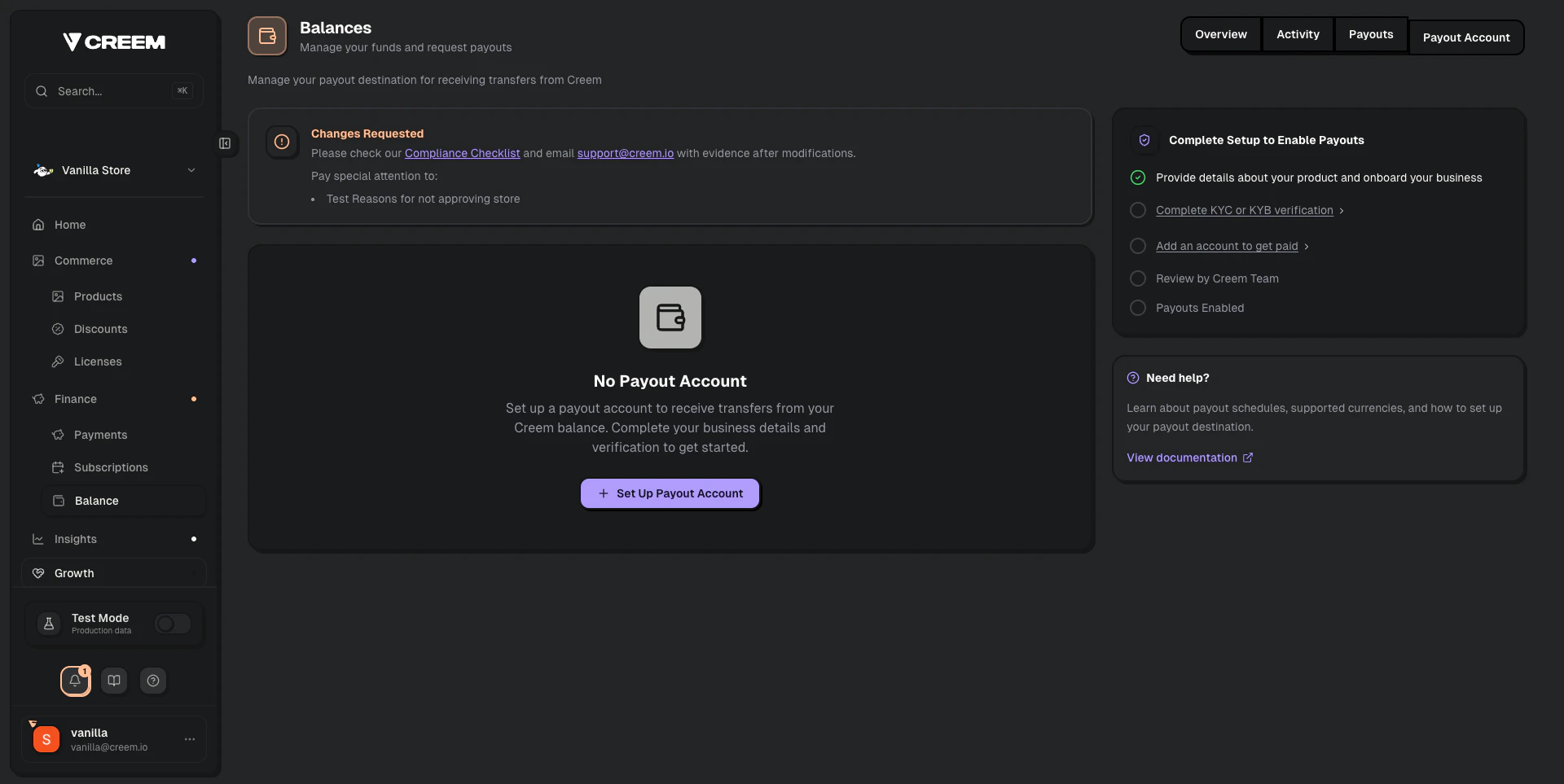
* **Changes requested** - Fix the flagged issues, then use the **Request re-review** button on the **Balance → Payout Account** page.
Step-by-step guide for fixing issues and using the Request re-review button.
### Where do I start the review?
Go to **Balance → Payout Account** and click **Set up Payout Account** to submit your details.
 ### What information is needed?
* Your full individual name and/or your business entity name
* Your store or product name
* The product URL of your store
* A description of your business and how you operate
* A description of the products you intend to sell through Creem
* Your country of tax residence
### Common reasons for requests for changes
1. **Support email mismatch** - The email in your Business Details doesn't match what's on your website.
2. **Website not accessible** - Your site is down, password-protected, or returning errors during review.
3. **Missing legal pages** - Your website needs a Privacy Policy and Terms of Service.
4. **False information** - Fake reviews, testimonials, or inflated user counts on your website.
5. **Product not ready** - If your product isn't live yet, use [Test Mode](/getting-started/test-mode) until it's ready.
6. **AI compliance issues** - AI image/video products are missing moderation, AUP, or clear product disclosures.
What to fix and how to request another review.
Extra rules for AI image and video generation products.
## Why do we review accounts?
We review accounts to ensure stores are legitimate and in compliance with our terms. This helps prevent fraud, misuse, malicious activity, and high-risk accounts.
## Product guidelines
### Acceptable products
We allow digital goods that can be fulfilled through Creem. Examples include:
* Software & SaaS
* eBooks
* PDFs
* Design assets
* Photos
* Audio
* Video
### Prohibited products
If you attempt to sell prohibited products or violate our terms, your account may be placed in review or suspended.
* Sexually-oriented or pornographic content of any kind, including AI-generated content and NSFW chatbots
* Face-swap, deepfake, and face-manipulation tools of any kind
* IPTV services
* Online traffic and engagement services
* Physical goods of any kind
* Spyware or parental control apps
* Donations or charity giving where no product exists or where the price is greater than the product value
* Products or content for which you do not hold a proper license or intellectual property rights
* Third-party content downloaders and rippers that violate platform Terms of Service
* Remote digital file-sharing services and cyberlockers
* Marketplaces where you use your Creem store to partner to sell others' products
* Dating sites
* PLR or MRR products where you do not hold the original IP rights
* Counterfeit goods
* Illegal or age-restricted products such as drugs, alcohol, tobacco, vaping products, or weapons
* Regulated services such as gambling, lending, telemarketing, debt relief, or banking/financing services
* Metaphysical, fortune-telling, and spiritual outcome services
* Timeshares
* Pharmacies, pharmaceuticals, and nutraceuticals
* Homework/essay mills
* Multi-level marketing, pyramid, or IBO schemes
* NFT & crypto asset products
* In-game items, currencies, and virtual goods tied to third-party games
* Trading tools and services
* Any other products that our providers and partners deem too risky
### Restricted products
* Services of any kind, including marketing, design, web development, consulting, and similar work
* Job boards
* Advertising in newsletters, on websites, or in social media posts
* API resellers. We can only support established resellers, who must provide their previous payment processor, chargeback rate (with screenshots of the rate and transaction volume), and reason for moving to Creem.
If you are unsure whether your content is prohibited, contact Creem support with a description or example before you start selling.
## Customer experience and support
Providing excellent customer support is a core requirement for all merchants on Creem.
* **A visible support email is mandatory.** This email must be accessible on your public website and within the user dashboard.
* **Use a branded support email.** If your product is `MintAI`, your support email should be `support@mintai.com`, not a generic address.
* **Users must be able to cancel subscriptions directly from your product.** You can do this via the Cancel Subscription API or by redirecting users to the Creem Customer Portal.
* **Respond to customer requests within 3 business days.** If you do not respond within that timeframe, Creem may issue a refund on your behalf.
### What information is needed?
* Your full individual name and/or your business entity name
* Your store or product name
* The product URL of your store
* A description of your business and how you operate
* A description of the products you intend to sell through Creem
* Your country of tax residence
### Common reasons for requests for changes
1. **Support email mismatch** - The email in your Business Details doesn't match what's on your website.
2. **Website not accessible** - Your site is down, password-protected, or returning errors during review.
3. **Missing legal pages** - Your website needs a Privacy Policy and Terms of Service.
4. **False information** - Fake reviews, testimonials, or inflated user counts on your website.
5. **Product not ready** - If your product isn't live yet, use [Test Mode](/getting-started/test-mode) until it's ready.
6. **AI compliance issues** - AI image/video products are missing moderation, AUP, or clear product disclosures.
What to fix and how to request another review.
Extra rules for AI image and video generation products.
## Why do we review accounts?
We review accounts to ensure stores are legitimate and in compliance with our terms. This helps prevent fraud, misuse, malicious activity, and high-risk accounts.
## Product guidelines
### Acceptable products
We allow digital goods that can be fulfilled through Creem. Examples include:
* Software & SaaS
* eBooks
* PDFs
* Design assets
* Photos
* Audio
* Video
### Prohibited products
If you attempt to sell prohibited products or violate our terms, your account may be placed in review or suspended.
* Sexually-oriented or pornographic content of any kind, including AI-generated content and NSFW chatbots
* Face-swap, deepfake, and face-manipulation tools of any kind
* IPTV services
* Online traffic and engagement services
* Physical goods of any kind
* Spyware or parental control apps
* Donations or charity giving where no product exists or where the price is greater than the product value
* Products or content for which you do not hold a proper license or intellectual property rights
* Third-party content downloaders and rippers that violate platform Terms of Service
* Remote digital file-sharing services and cyberlockers
* Marketplaces where you use your Creem store to partner to sell others' products
* Dating sites
* PLR or MRR products where you do not hold the original IP rights
* Counterfeit goods
* Illegal or age-restricted products such as drugs, alcohol, tobacco, vaping products, or weapons
* Regulated services such as gambling, lending, telemarketing, debt relief, or banking/financing services
* Metaphysical, fortune-telling, and spiritual outcome services
* Timeshares
* Pharmacies, pharmaceuticals, and nutraceuticals
* Homework/essay mills
* Multi-level marketing, pyramid, or IBO schemes
* NFT & crypto asset products
* In-game items, currencies, and virtual goods tied to third-party games
* Trading tools and services
* Any other products that our providers and partners deem too risky
### Restricted products
* Services of any kind, including marketing, design, web development, consulting, and similar work
* Job boards
* Advertising in newsletters, on websites, or in social media posts
* API resellers. We can only support established resellers, who must provide their previous payment processor, chargeback rate (with screenshots of the rate and transaction volume), and reason for moving to Creem.
If you are unsure whether your content is prohibited, contact Creem support with a description or example before you start selling.
## Customer experience and support
Providing excellent customer support is a core requirement for all merchants on Creem.
* **A visible support email is mandatory.** This email must be accessible on your public website and within the user dashboard.
* **Use a branded support email.** If your product is `MintAI`, your support email should be `support@mintai.com`, not a generic address.
* **Users must be able to cancel subscriptions directly from your product.** You can do this via the Cancel Subscription API or by redirecting users to the Creem Customer Portal.
* **Respond to customer requests within 3 business days.** If you do not respond within that timeframe, Creem may issue a refund on your behalf.