> ## Documentation Index
> Fetch the complete documentation index at: https://docs.creem.io/llms.txt
> Use this file to discover all available pages before exploring further.
# Build a Safe, Metered AI Image and Video Generator with Creem
> Moderate every prompt, charge prepaid credits per generation, and auto-refund failed jobs with Creem's Moderation and Customer Credits APIs in a Next.js application.
Charging for AI generations in a way that meets [MoR or PSP guidelines](/merchant-of-record/account-reviews/ai-wrapper-compliance) is hard with unmoderated prompts, failed generations and incorrect customer credits deduction. For e.g., Adobe Firefly users [report failed video jobs that produce nothing yet still deduct credits](https://community.adobe.com/t5/adobe-firefly-bugs/credits-are-being-deducted-even-when-video-generation-fails/idi-p/15659871), with one person losing 680 credits across 17 error-filled attempts. Users are bound to get frustrated if charges are made before the provider is sure that the model worked, or before the prompt has been screened. The fix is in the order of generation steps: moderate the prompt, charge the credits, generate, and refund automatically if the model fails.
In this guide you build [Aperture](https://github.com/armitage-labs/creem/tree/main/packages/examples/safe-metered-ai-generator), a reference image and video generator that uses Creem for billing and moderation. Credits are managed by the [Customer Credits API](/features/customer-credits/introduction#quick-start), and every prompt is validated through the [Moderation API](/features/moderation).
## Demo
Aperture implements the following four-step order for every generation:
```mermaid theme={null}
flowchart TD
A["MODERATE
screen the prompt first"]
B["DEBIT
charge credits up front (idempotent)"]
C["GENERATE
call the model (black box)"]
D["RETURN / REVERSE
return the asset. if the model failed
after the debit, reverse it so the
customer keeps their credits"]
A --> B --> C --> D
```
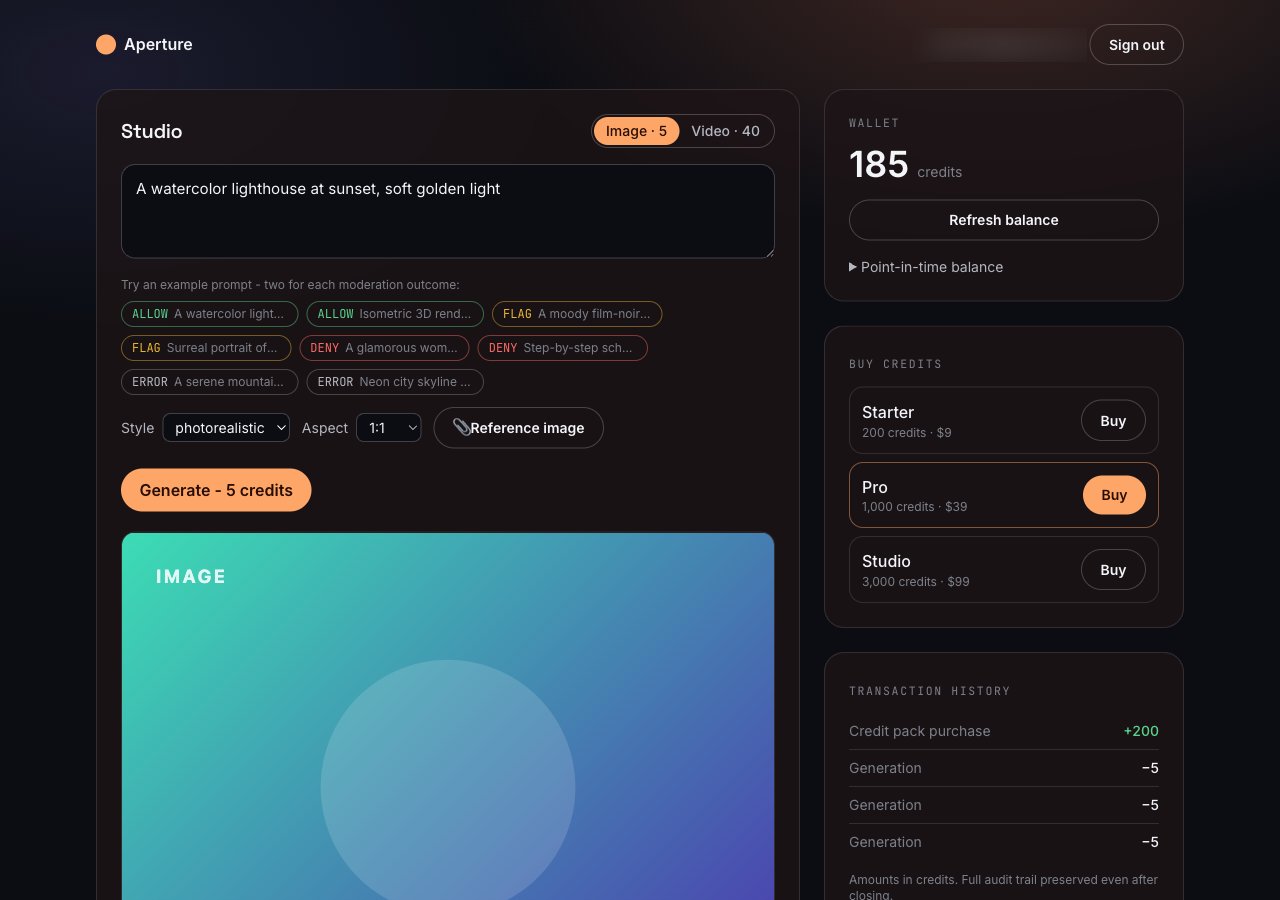
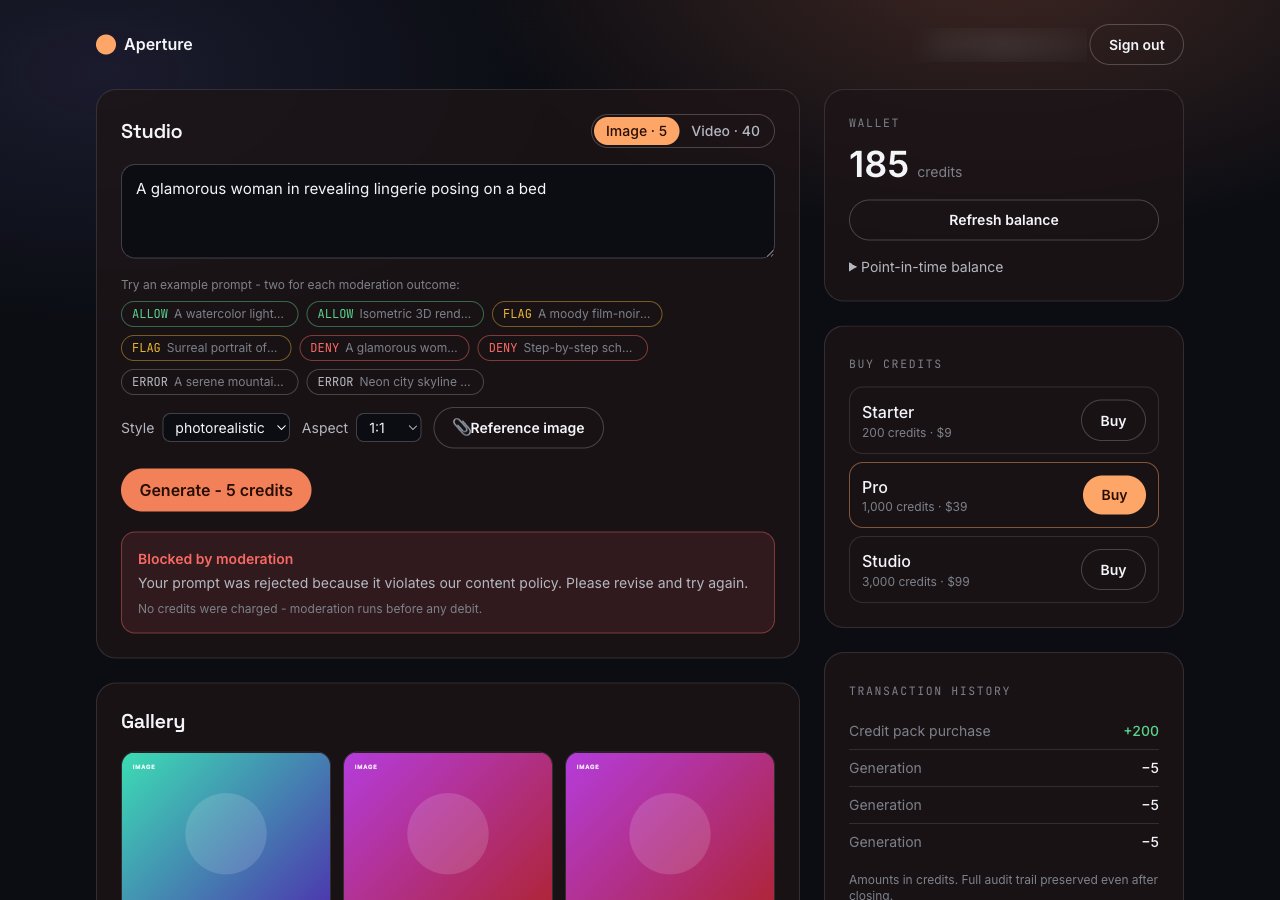
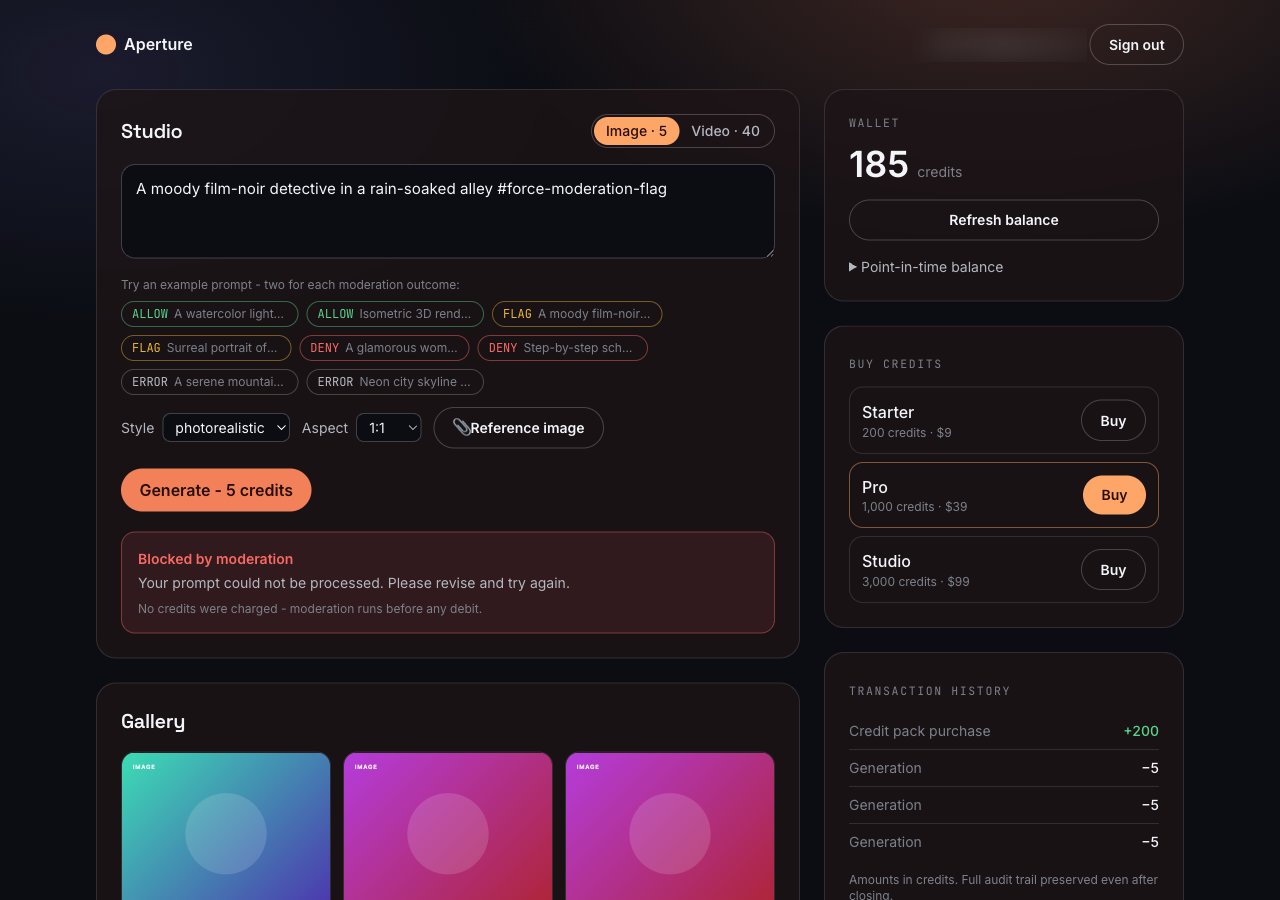
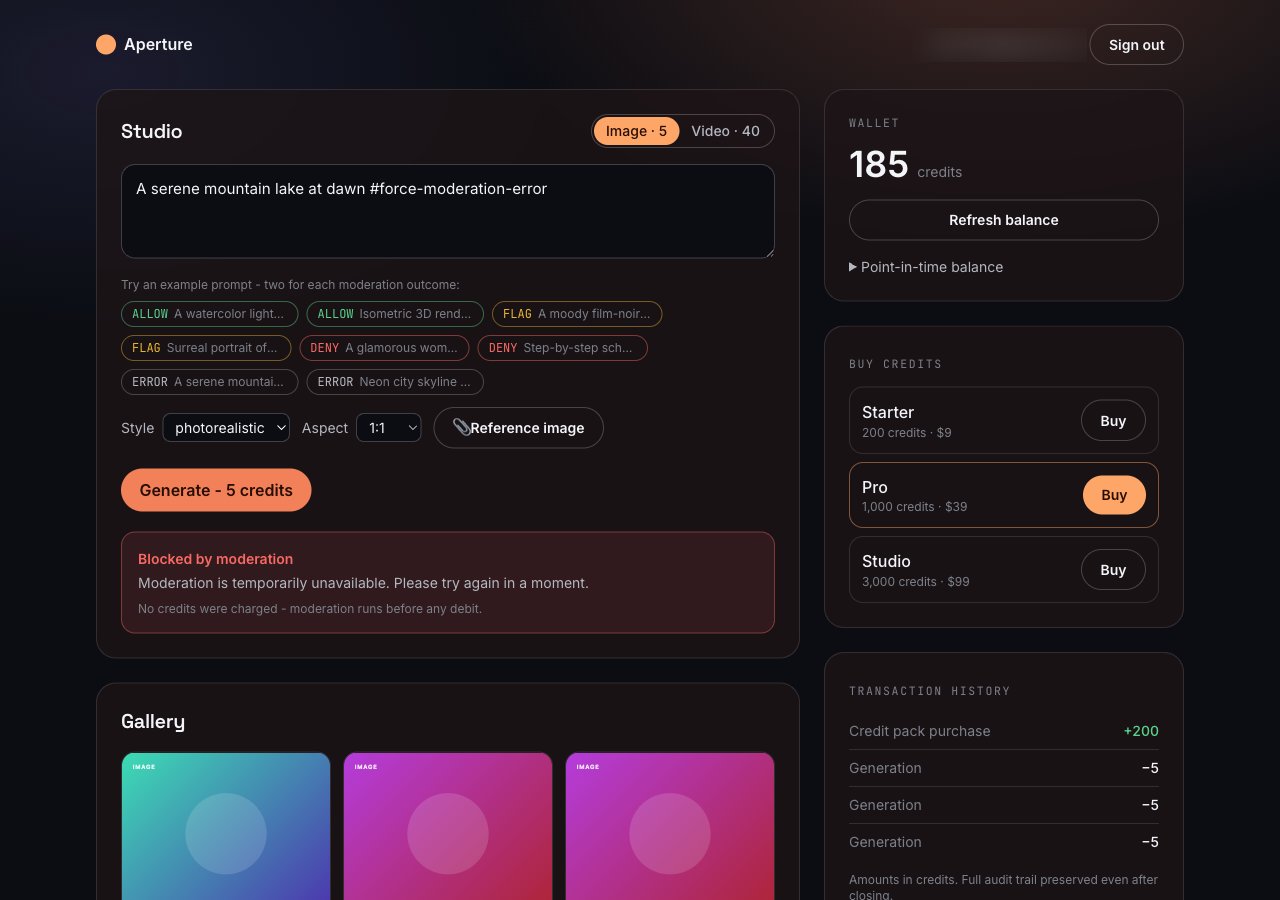
Try it at [aperture-creem.vercel.app](https://aperture-creem.vercel.app). The tabs below show the possible prompt moderation results in the application:
An ordinary prompt, screened by the live Moderation API and verified to pass. It clears moderation, debits 5 credits, renders a poster into the gallery, and the wallet drops by 5.
 An ordinary prompt the live API rejects on policy grounds. It is blocked before any debit, the wallet does not change, and the attempt is recorded as `rejected`.
 A prompt containing `#force-moderation-flag`, which forces the flag branch so you can see the app block a flag.
 A prompt containing `#force-moderation-error`, which forces the moderation call to fail so you can see the fail-closed path. Worst case in production, it blocks a request that would otherwise be screened normally.
 ## Prerequisites
* Node.js 22 or newer, and pnpm 11
* A [Creem](https://creem.io) account
* A [Neon](https://console.neon.tech) account
## Clone the project
Since there's a lot to cover in this application, the better way is to clone the project, install its dependencies, and then learn the core parts around moderation and billing with Creem.
Run the following commands to clone and install the project:
```bash theme={null}
pnpm dlx degit armitage-labs/creem/packages/examples/safe-metered-ai-generator safe-metered-ai-generator
cd safe-metered-ai-generator
pnpm install
```
It installs the following important dependencies:
* `creem` is the official SDK through which the Customer Credits and Moderation are managed.
* `@creem_io/better-auth` is the Better Auth plugin of Creem. It syncs `user.creemCustomerId` on the first checkout and serves the Creem webhook.
* `better-auth` handles email and password sign-in.
* `@neondatabase/serverless` to query Postgres in serverless functions over HTTP requests.
Then, copy the environment variable file with the following command:
```bash theme={null}
cp .env.example .env.local
```
Now, let's provision a serverless Postgres as the database.
## Provision a Serverless Postgres
To set up a serverless Postgres, go to the [Neon console](https://console.neon.tech/app/projects) and create a new project. Once your project is created, you will receive a connection string that you can use to connect to your Neon database. The connection string will look like this:
```bash shouldWrap theme={null}
postgresql://:@.neon.tech:/?sslmode=require&channel_binding=require
```
Use this connection string as an environment variable designated as `DATABASE_URL` in the `.env.local` file.
## Configure Creem credentials
Grab your API key from the [Developers section](https://creem.io/dashboard/developers) of the dashboard and set it as `CREEM_API_KEY`. The app picks test vs production mode from the key prefix (`creem_test_` is test mode).
Each pack (Starter, Pro, and Studio) maps to a one-time Creem product. With `CREEM_API_KEY` set, run the setup script to create all three at once:
```bash theme={null}
pnpm products:setup
```
It prints the three `CREEM_PRODUCT_*` lines to paste into `.env.local`. Re-running in the same mode returns the existing products instead of creating duplicates.
Prefer the dashboard? In the [products tab](https://creem.io/dashboard/products), create one product per pack and copy each product ID (it starts with `prod_`) into `CREEM_PRODUCT_STARTER`, `CREEM_PRODUCT_PRO`, and `CREEM_PRODUCT_STUDIO`.
In the **Developers > Webhooks** section of the dashboard, create a webhook endpoint and subscribe it to `checkout.completed`. You don't have your local tunnel URL yet, so use any placeholder for now such as `https://example.com/api/auth/creem/webhook`. Then, copy the endpoint's signing secret into `CREEM_WEBHOOK_SECRET`.
That secret is tied to the unique webhook and it remains the same when you repoint the URL at your tunnel from the instructions in the [test webhooks locally](#test-webhooks-locally) section.
[Better Auth](https://better-auth.com/) signs sessions with `BETTER_AUTH_SECRET`. Generate a random value with the following and update in the `.env.local` file:
```bash theme={null}
openssl rand -base64 32
```
Once that's done, execute the following command in your terminal to see the application in action on [localhost:3000](http://localhost:3000):
```bash theme={null}
pnpm dev
```
Press `CTRL-C` to stop the server and now let's move to understanding the codebase.
## Initialize the Creem SDK client
Every call in the app reuses a single SDK instance from [`src/lib/creem/client.ts`](https://github.com/armitage-labs/creem/blob/main/packages/examples/safe-metered-ai-generator/src/lib/creem/client.ts):
```ts theme={null}
import { Creem } from "creem";
import { env } from "../env";
export const creemClient = new Creem({
apiKey: env.creemApiKey,
server: env.isTestMode ? "test" : "prod",
});
```
The SDK picks the host from the `server` option (`api.creem.io` for production, `test-api.creem.io` for test) and adds the `x-api-key` header to every request. The app sets `server` by checking whether the API key starts with `creem_test_`.
## Set up the database schema
Creem is the source of truth for balances, so the schema in [`db/schema.sql`](https://github.com/armitage-labs/creem/blob/main/packages/examples/safe-metered-ai-generator/db/schema.sql) only has the Better Auth tables and a few application tables. Two of them related to billing are as follows:
```sql theme={null}
-- maps one app user to one Creem credit wallet.
-- account_id is a Creem cca_… id; provider is always 'creem'.
CREATE TABLE IF NOT EXISTS "credit_account" (
"user_id" TEXT PRIMARY KEY REFERENCES "user"("id") ON DELETE CASCADE,
"creem_customer_id" TEXT NOT NULL,
"account_id" TEXT NOT NULL,
"provider" TEXT NOT NULL DEFAULT 'creem',
"unit_label" TEXT NOT NULL DEFAULT 'credits',
"status" TEXT NOT NULL DEFAULT 'active',
-- ...
);
-- a denormalised mirror of every wallet movement, for fast history and audit.
CREATE TABLE IF NOT EXISTS "credit_ledger_cache" (
"id" TEXT PRIMARY KEY,
"user_id" TEXT NOT NULL REFERENCES "user"("id") ON DELETE CASCADE,
"account_id" TEXT NOT NULL,
"transaction_id" TEXT,
"side" TEXT NOT NULL, -- 'credit' | 'debit'
"amount" NUMERIC NOT NULL,
"reference" TEXT,
"kind" TEXT, -- pack_purchase | generation | refund | adjustment
-- ...
);
```
* `credit_account` is a lookup table. It does not store a balance. It only remembers which Creem account id (`cca_…`) belongs to which user, so a request can ask Creem for the live balance of the customer.
* `credit_ledger_cache` is a read model. It mirrors every credit and debit. It enables fetching the transaction history page without a round trip to Creem on every page load. It also keeps an audit trail after an account is closed.
Now, apply the schema in your database with the following command:
```bash theme={null}
pnpm db:migrate
```
## Test webhooks locally
Creem cannot POST the `checkout.completed` webhook to `localhost`, so the buy flow needs a public URL for that endpoint. A [localtunnel](https://github.com/localtunnel/localtunnel) enables you to map a localhost port to a public and a secure `https` domain.
1. Run the application in one terminal:
```bash theme={null}
pnpm dev
```
2. Open a tunnel to the same port in another terminal:
```bash theme={null}
npx -y localtunnel --port 3000
# → your url is: https://tidy-otters-jam.loca.lt
```
3. In the Creem dashboard, open the webhook endpoint you created earlier and update its URL to `https://.loca.lt/api/auth/creem/webhook`. The signing secret remains unchanged.
4. Sign up, buy a pack (the 100 percent off code makes it \$0), and complete the Creem checkout. Creem posts the webhook to the tunnel, the tunnel forwards it to your local endpoint, `onCheckoutCompleted` credits the wallet, and the balance widget updates on refresh.
Keep `NEXT_PUBLIC_APP_URL` and `BETTER_AUTH_URL` as `http://localhost:3000` so your auth cookies and the success redirect stay on localhost while you browse. You only need the tunnel for the inbound webhook.
## Screen the prompt before generation
Creem [requires moderation on AI generation products](/features/moderation#why-moderation-matters), so the wrapper in [`src/lib/creem/moderation.ts`](https://github.com/armitage-labs/creem/blob/main/packages/examples/safe-metered-ai-generator/src/lib/creem/moderation.ts) follows three rules:
1. Screen the prompt before anything else.
2. Block on both `deny` and `flag`.
3. If the call errors or times out, block. Never generate on an unknown answer.
```ts theme={null}
export async function screenPrompt(prompt: string, externalId?: string): Promise {
try {
const data = await creemClient.moderation.screenPrompt(
{ prompt, externalId },
{ timeoutMs: 5000 }, // a slow moderator must not hold the request open forever
);
const decision = data.decision;
if (decision === "allow") {
return { decision: "allow", allowed: true, raw: data };
}
if (decision === "deny" || decision === "flag") {
return blocked(decision, data);
}
// Unknown or absent decision. Do not assume safe. Fail closed.
return blocked("error", data);
} catch {
// API error, network error, or timeout. Fail closed.
return blocked("error");
}
}
```
`allowed` is `true` only on an explicit `allow`. Every other branch, including the empty `catch`, returns `false`. So the request is blocked on any error, timeout, or an unknown response code. This ensures that generations are always moderated.
## Implement the wallet layer
Every balance change goes through one module, [`src/lib/wallet.ts`](https://github.com/armitage-labs/creem/blob/main/packages/examples/safe-metered-ai-generator/src/lib/wallet.ts) and is used by routes and the webhook. It calls the Creem API on every generation, and then it mirrors the actions into Postgres for history and auditing.
The wallet layer is comprised of two files:
* [`src/lib/wallet.ts`](https://github.com/armitage-labs/creem/blob/main/packages/examples/safe-metered-ai-generator/src/lib/wallet.ts): exposes wallet controls, such as `creditPack`, `debitForGeneration`, `refundDebit`, `getBalance`, `listHistory`, and the account controls (`freeze`, `unfreeze`, `close`).
* [`src/lib/creem/credits-creem.ts`](https://github.com/armitage-labs/creem/blob/main/packages/examples/safe-metered-ai-generator/src/lib/creem/credits-creem.ts): adapter over `creemClient.customerCredits.*`. It makes the Creem calls and maps the camelCase responses onto the application's snake\_case types.
### Use idempotency keys on every step
Retries in applications happen for ordinary reasons:
* a webhook fires twice
* a user double-clicks Buy
* a network blip makes a client resend a request that already succeeded
An [idempotency key](/features/customer-credits/transactions#what-is-an-idempotency_key) means Creem treats the retry as the same operation and does not change the balance on a duplicated request. Here is how a pack purchase is credited:
```ts theme={null}
export async function creditPack(args: {
userId: string;
accountId: string;
amount: number;
reference: string;
idempotencyKey: string;
}): Promise {
const result = await credits.credit(args.accountId, {
amount: String(args.amount),
reference: args.reference,
idempotencyKey: args.idempotencyKey,
});
await cacheMovement({
/* mirror into credit_ledger_cache */
});
return result;
}
```
Creem applies the credit against the account, and `cacheMovement` mirrors the same entry into `credit_ledger_cache` so the history page can render it without another round trip.
The debit path for a generation follows the same shape, and it also turns a Creem "not enough balance" response into a typed error for the catch block.
```ts theme={null}
async debit(accountId, input) {
try {
const txn = await creemClient.customerCredits.debitAccount(accountId, input)
return toTransaction(txn)
} catch (err) {
if (isInsufficient(err)) throw new InsufficientBalanceError()
throw err
}
}
```
In the code above, `isInsufficient` reads the Creem error, either an HTTP 422 or an "insufficient" marker in the body, so the application can show the user a clean "you need N credits" (instead of a raw API error).
### Read current and point-in-time balances
The balance read passes an optional `at` timestamp to Creem:
```ts theme={null}
async getBalance(accountId: string, at?: string): Promise {
const balance = await creemClient.customerCredits.getAccountBalance(accountId, at)
return toBalance(balance)
}
```
In the code above:
* With no `at`, you get the current balance.
* With an ISO timestamp, you get the balance at that moment. This is helpful for a support question like "how many credits did this customer have on the 3rd August".
### Reverse a debit
Creem has a reversal operation enabling you to skip manual re-credits. When a generation fails after you've charged, you can reverse the exact debit transaction:
```ts theme={null}
export async function refundDebit(args: {
userId: string;
accountId: string;
transactionId: string;
amount: number;
reference: string;
}): Promise {
const result = await credits.reverse(args.accountId, args.transactionId);
await cacheMovement({ ...args, side: "credit", kind: "refund" });
return result;
}
```
A reversal adds a compensating entry, which shows both the charge and the refund in history. This is helpful for customer support when you need to see the usage history to answer queries.
## Implement the generation route
When a generation is requested via [`src/app/api/generate/route.ts`](https://github.com/armitage-labs/creem/blob/main/packages/examples/safe-metered-ai-generator/src/app/api/generate/route.ts), it goes through the four steps shared earlier in-order. In this section, we cover each step in detail. Let's start with how requests are validated.
### Validate the request
The route uses a [withUser](https://github.com/armitage-labs/creem/blob/main/packages/examples/safe-metered-ai-generator/src/lib/session.ts#L37) re-usable function to allow only authenticated user to request generations. It parses the body with [Zod](https://zod.dev/), sets the cost from the media type (an image is 5 credits, a video is 40), and accepts an optional client-supplied idempotency key so a retry from the browser doesn't double-charge or double-generate.
It also validates the optional reference image. The `imageDataUrl` has to be a base64 image data URL, and the route rejects anything over 2.5 MB (as a demonstration of enforcing limits).
```ts theme={null}
if (imageDataUrl) {
const bytes = dataUrlByteLength(imageDataUrl);
if (bytes === null)
return NextResponse.json(
{ error: "invalid_image", message: "Reference image must be a base64 data URL." },
{ status: 400 },
);
if (bytes > MAX_IMAGE_BYTES)
return NextResponse.json(
{ error: "image_too_large", message: `Reference image must be under ${MAX_IMAGE_LABEL}.` },
{ status: 413 },
);
}
```
### Replay a completed request
The route then checks whether this idempotency key already produced a finished generation. If it did, it returns that result and runs nothing else.
```ts theme={null}
// Idempotency: if this key already produced a completed generation, replay it.
const prior = await queryOne(
`SELECT id, status, result_url FROM generation
WHERE user_id=$1 AND idempotency_key=$2 ORDER BY created_at DESC LIMIT 1`,
[user.id, idempotencyKey],
);
if (prior && prior.status === "completed") {
return NextResponse.json({
id: prior.id,
status: "completed",
url: prior.result_url,
replayed: true,
});
}
```
Before consuming credits, it checks that the user has a wallet and that the wallet is `active`. A frozen or closed account is turned away with a clear status. Then the following four steps run:
### Step 1: moderate
If the prompt doesn't clear, the route records a `rejected` generation and returns. Nothing has been charged from the user in this case.
```ts theme={null}
const moderation = await screenPrompt(prompt, `user_${user.id}:gen_${genId}`);
if (!moderation.allowed) {
await recordGeneration({
/* status: 'rejected', decision: moderation.decision */
});
return NextResponse.json(
{ id: genId, status: "rejected", decision: moderation.decision, message: moderation.reason },
{ status: 400 },
);
}
```
### Step 2: debit
The user is then charged (before the model runs). A separate idempotency key derived from the request key keeps the debit itself safe to retry. An insufficient balance is caught as a 402, and the generation is recorded so the generation attempt is not lost.
```ts theme={null}
let debitTxnId: string;
try {
const txn = await debitForGeneration({
userId: user.id,
accountId: account.accountId,
amount: cost,
reference: `gen:${genId}`,
idempotencyKey: `debit_${idempotencyKey}`,
});
debitTxnId = txn.id;
} catch (err) {
if (err instanceof InsufficientBalanceError) {
await recordGeneration({
/* status: 'insufficient_credits' */
});
return NextResponse.json(
{
status: "insufficient_credits",
message: `You need ${cost} credits for this ${mediaType}.`,
},
{ status: 402 },
);
}
return NextResponse.json({ error: "billing_error" }, { status: 502 });
}
```
### Step 3 and 4: generate, then return or reverse
Then, the model runs to generate the desired asset. If it fails, the route catches that failure and reverses the exact debit, so the user keeps their credits.
```ts theme={null}
try {
const generator = getGenerator();
const result = await generator.generate({
prompt,
mediaType,
imageDataUrl,
options,
requestId: genId,
});
// 4. RETURN
await query(`UPDATE generation SET status='completed', result_url=$2 WHERE id=$1`, [
genId,
result.url,
]);
return NextResponse.json({ id: genId, status: "completed", url: result.url, cost });
} catch (err) {
// Model failed AFTER we charged. Reverse the debit, but only claim a refund
// once the reversal actually lands.
try {
await refundDebit({
userId: user.id,
accountId: account.accountId,
transactionId: debitTxnId,
amount: cost,
reference: `refund:${genId}`,
});
} catch (refundErr) {
// Reversal failed: the user is still charged. Do not claim a refund that
// never happened. Mark it failed for reconciliation and say so.
await query(`UPDATE generation SET status='failed', error=$2 WHERE id=$1`, [
genId,
"generation+refund failed",
]);
return NextResponse.json(
{
status: "failed",
message:
"Generation failed and your credits could not be automatically refunded - our team will reconcile this shortly.",
},
{ status: 502 },
);
}
// Reversal succeeded. Now it is safe to record and report the refund.
await query(`UPDATE generation SET status='refunded', error=$2 WHERE id=$1`, [
genId,
String(err.message).slice(0, 500),
]);
return NextResponse.json(
{ status: "refunded", message: "Generation failed - your credits were refunded." },
{ status: 502 },
);
}
```
In the code above:
* `refunded` is only reported after the reversal succeeds.
* If the reversal fails and the customer is still charged, the route marks the row `failed`, logs a warning with the generation id, and tells the customer the team will sort it out.
* The `generation` table records each step: the moderation decision, the debit transaction id, and the final status to ensure that you can audit the events in future.
### Prevent duplicate charges with an advisory lock
Idempotency keys make a retry safe once the first request has finished. Two requests with the same key can also be in flight at the same moment, though, like a client that retries before the first response comes back. If both slipped past the replay check together, both would debit and both would call the model.
The generation route closes that window with a Postgres advisory lock. The flow runs on a dedicated connection while holding a lock keyed on the user id and the idempotency key. A racing duplicate blocks on the lock until the first request finishes, then reaches the replay check and returns the first result instead of charging again.
```ts theme={null}
const lockName = `gen:${user.id}:${idempotencyKey}`;
const lockClient = await pool.connect();
try {
await lockClient.query("SELECT pg_advisory_lock(hashtext($1))", [lockName]);
return await runGeneration();
} finally {
try {
await lockClient.query("SELECT pg_advisory_unlock(hashtext($1))", [lockName]);
lockClient.release();
} catch (unlockErr) {
// Destroy the connection so a session lock that failed to release can never
// return to the pool still held.
lockClient.release(unlockErr as Error);
}
}
```
In the code above:
* Since two independent generations will use different keys, the lock in the application code only ever serializes true duplicates.
* If the unlock query fails, it destroys the connection to Postgres so a session lock can not be reused by another request from the pool.
## Sell credit packs
The pricing page lists three packs, defined in [`src/lib/packs.ts`](https://github.com/armitage-labs/creem/blob/main/packages/examples/safe-metered-ai-generator/src/lib/packs.ts), and each one maps to a Creem product through the env vars you set earlier:
```ts theme={null}
export const PACKS: Pack[] = [
{ id: "starter", name: "Starter", credits: 200, priceUsd: 9, productId: env.products.starter },
{
id: "pro",
name: "Pro",
credits: 1000,
priceUsd: 39,
productId: env.products.pro,
featured: true,
},
{ id: "studio", name: "Studio", credits: 3000, priceUsd: 99, productId: env.products.studio },
];
```
Clicking "Buy" calls [`src/app/api/checkout/route.ts`](https://github.com/armitage-labs/creem/blob/main/packages/examples/safe-metered-ai-generator/src/app/api/checkout/route.ts), which opens a Creem checkout for that product and returns the URL. The important line is `metadata.referenceId`, which passes the app user id into the checkout so the webhook can credit the right wallet.
```ts theme={null}
const { url } = await createCheckout(
{ apiKey: env.creemApiKey, testMode: env.isTestMode },
{
productId: pack.productId,
customer: { email: user.email },
successUrl: `${env.appUrl}/success`,
...(DISCOUNT_CODE ? { discountCode: DISCOUNT_CODE } : {}),
metadata: { referenceId: user.id, packId: pack.id },
},
);
```
## Credit the wallet from the webhook
The Creem plugin in [`src/lib/auth.ts`](https://github.com/armitage-labs/creem/blob/main/packages/examples/safe-metered-ai-generator/src/lib/auth.ts) verifies the webhook signature for you and serves the endpoint at `/api/auth/creem/webhook`. Your job is the `onCheckoutCompleted` hook, which runs after a confirmed payment:
```ts theme={null}
onCheckoutCompleted: async ({ customer, product, order, metadata }) => {
const customerId = customer?.id;
const userId = metadata?.referenceId as string | undefined;
if (!customerId || !userId) return;
const pack = getPackByProductId(product?.id ?? "");
if (!pack) return;
// Ensure the wallet exists for the now-known Creem customer, then credit it.
const account = await ensureAccountForUser(userId, customerId);
await creditPack({
userId,
accountId: account.accountId,
amount: pack.credits,
reference: `pack:${pack.id}:order:${order?.id ?? "unknown"}`,
idempotencyKey: `pack_${order?.id ?? `${userId}_${pack.id}`}`,
});
};
```
In the code above:
* `ensureAccountForUser` function creates the Creem credit wallet the first time a customer pays, using the customer id from the webhook. It serializes per-user creation behind a transaction-scoped advisory lock (`pg_advisory_xact_lock`) and re-checks the table inside the lock, so exactly one wallet is created per user.
* The idempotency key is built from the order id, so if Creem retries the webhook, the same order does not credit the wallet twice.
* The hook does not wrap the crediting in a try/catch. If crediting fails on a database or a network hiccup, the error throw returns a non-2xx from the webhook, so Creem retries delivery and the credits get applied on a later automatic attempt.
## Protect routes with authentication checks
The application dashboard and API routes are protected by two checks:
* [`src/proxy.ts`](https://github.com/armitage-labs/creem/blob/main/packages/examples/safe-metered-ai-generator/src/proxy.ts) that denies any request to a protected route with no session cookie:
```ts theme={null}
export function proxy(request: NextRequest) {
const sessionCookie = getSessionCookie(request);
if (!sessionCookie) return NextResponse.json({ error: "unauthorized" }, { status: 401 });
return NextResponse.next();
}
export const config = {
matcher: ["/api/checkout", "/api/generate", "/api/generations", "/api/credits/:path*"],
};
```
Note that the cookie check doesn't prove the session is valid. It only rejects requests that carry no session cookie at all.
* Every route re-checks the session server-side with `withUser` in [`src/lib/session.ts`](https://github.com/armitage-labs/creem/blob/main/packages/examples/safe-metered-ai-generator/src/lib/session.ts), which calls Better Auth's `getSession`.
## Freeze, unfreeze, and close accounts
Running a credits product means you eventually have to freeze a suspicious account, unfreeze it after review, or close one.
Those functionalities are available in the wallet layer of the application, and are exposed through [`src/app/api/credits/account/route.ts`](https://github.com/armitage-labs/creem/blob/main/packages/examples/safe-metered-ai-generator/src/app/api/credits/account/route.ts):
```ts theme={null}
try {
if (parsed.data.action === "freeze") await freezeAccount(user.id);
else if (parsed.data.action === "unfreeze") await unfreezeAccount(user.id);
else await closeAccount(user.id);
} catch (err) {
console.error("[account] lifecycle action failed:", err);
return NextResponse.json(
{ error: "action_failed", message: (err as Error).message },
{ status: 502 },
);
}
```
While freeze operations are reversible, closing an account can not be reversed. Closing an account, though, preserves its ledger with the `credit_ledger_cache` table in the database.
The transaction history itself comes from [`src/app/api/credits/history/route.ts`](https://github.com/armitage-labs/creem/blob/main/packages/examples/safe-metered-ai-generator/src/app/api/credits/history/route.ts) where the wallet reads the live entries from Creem and populates each one with the `reference` and `kind` from the cache (database) mirror, because Creem's `/entries` endpoint leaves the reference off.
## Swap in a real model
In Aperture's code, the AI-powered generator is a black box in an interface in [`src/lib/generator/index.ts`](https://github.com/armitage-labs/creem/blob/main/packages/examples/safe-metered-ai-generator/src/lib/generator/index.ts). The default is a `StubGenerator` that renders a gradient poster from the prompt, to demonstrate the billing and moderation flow runs with no model credentials and at no cost. To use a real model, implement the interface and register it like following:
```ts theme={null}
// src/lib/generator/fal.ts
export class FalGenerator implements Generator {
readonly name = "fal";
async generate({
prompt,
mediaType,
imageDataUrl,
options,
}: GenerateInput): Promise {
// call fal, return { url, mediaType }
}
}
```
Then, add a `case 'fal'` in `getGenerator()` and set `GENERATOR=fal` as the environment variable. This allows you to use any model (or even multiple ones) without any change in the billing or moderation flow.
## Deploy to Vercel
## Prerequisites
* Node.js 22 or newer, and pnpm 11
* A [Creem](https://creem.io) account
* A [Neon](https://console.neon.tech) account
## Clone the project
Since there's a lot to cover in this application, the better way is to clone the project, install its dependencies, and then learn the core parts around moderation and billing with Creem.
Run the following commands to clone and install the project:
```bash theme={null}
pnpm dlx degit armitage-labs/creem/packages/examples/safe-metered-ai-generator safe-metered-ai-generator
cd safe-metered-ai-generator
pnpm install
```
It installs the following important dependencies:
* `creem` is the official SDK through which the Customer Credits and Moderation are managed.
* `@creem_io/better-auth` is the Better Auth plugin of Creem. It syncs `user.creemCustomerId` on the first checkout and serves the Creem webhook.
* `better-auth` handles email and password sign-in.
* `@neondatabase/serverless` to query Postgres in serverless functions over HTTP requests.
Then, copy the environment variable file with the following command:
```bash theme={null}
cp .env.example .env.local
```
Now, let's provision a serverless Postgres as the database.
## Provision a Serverless Postgres
To set up a serverless Postgres, go to the [Neon console](https://console.neon.tech/app/projects) and create a new project. Once your project is created, you will receive a connection string that you can use to connect to your Neon database. The connection string will look like this:
```bash shouldWrap theme={null}
postgresql://:@.neon.tech:/?sslmode=require&channel_binding=require
```
Use this connection string as an environment variable designated as `DATABASE_URL` in the `.env.local` file.
## Configure Creem credentials
Grab your API key from the [Developers section](https://creem.io/dashboard/developers) of the dashboard and set it as `CREEM_API_KEY`. The app picks test vs production mode from the key prefix (`creem_test_` is test mode).
Each pack (Starter, Pro, and Studio) maps to a one-time Creem product. With `CREEM_API_KEY` set, run the setup script to create all three at once:
```bash theme={null}
pnpm products:setup
```
It prints the three `CREEM_PRODUCT_*` lines to paste into `.env.local`. Re-running in the same mode returns the existing products instead of creating duplicates.
Prefer the dashboard? In the [products tab](https://creem.io/dashboard/products), create one product per pack and copy each product ID (it starts with `prod_`) into `CREEM_PRODUCT_STARTER`, `CREEM_PRODUCT_PRO`, and `CREEM_PRODUCT_STUDIO`.
In the **Developers > Webhooks** section of the dashboard, create a webhook endpoint and subscribe it to `checkout.completed`. You don't have your local tunnel URL yet, so use any placeholder for now such as `https://example.com/api/auth/creem/webhook`. Then, copy the endpoint's signing secret into `CREEM_WEBHOOK_SECRET`.
That secret is tied to the unique webhook and it remains the same when you repoint the URL at your tunnel from the instructions in the [test webhooks locally](#test-webhooks-locally) section.
[Better Auth](https://better-auth.com/) signs sessions with `BETTER_AUTH_SECRET`. Generate a random value with the following and update in the `.env.local` file:
```bash theme={null}
openssl rand -base64 32
```
Once that's done, execute the following command in your terminal to see the application in action on [localhost:3000](http://localhost:3000):
```bash theme={null}
pnpm dev
```
Press `CTRL-C` to stop the server and now let's move to understanding the codebase.
## Initialize the Creem SDK client
Every call in the app reuses a single SDK instance from [`src/lib/creem/client.ts`](https://github.com/armitage-labs/creem/blob/main/packages/examples/safe-metered-ai-generator/src/lib/creem/client.ts):
```ts theme={null}
import { Creem } from "creem";
import { env } from "../env";
export const creemClient = new Creem({
apiKey: env.creemApiKey,
server: env.isTestMode ? "test" : "prod",
});
```
The SDK picks the host from the `server` option (`api.creem.io` for production, `test-api.creem.io` for test) and adds the `x-api-key` header to every request. The app sets `server` by checking whether the API key starts with `creem_test_`.
## Set up the database schema
Creem is the source of truth for balances, so the schema in [`db/schema.sql`](https://github.com/armitage-labs/creem/blob/main/packages/examples/safe-metered-ai-generator/db/schema.sql) only has the Better Auth tables and a few application tables. Two of them related to billing are as follows:
```sql theme={null}
-- maps one app user to one Creem credit wallet.
-- account_id is a Creem cca_… id; provider is always 'creem'.
CREATE TABLE IF NOT EXISTS "credit_account" (
"user_id" TEXT PRIMARY KEY REFERENCES "user"("id") ON DELETE CASCADE,
"creem_customer_id" TEXT NOT NULL,
"account_id" TEXT NOT NULL,
"provider" TEXT NOT NULL DEFAULT 'creem',
"unit_label" TEXT NOT NULL DEFAULT 'credits',
"status" TEXT NOT NULL DEFAULT 'active',
-- ...
);
-- a denormalised mirror of every wallet movement, for fast history and audit.
CREATE TABLE IF NOT EXISTS "credit_ledger_cache" (
"id" TEXT PRIMARY KEY,
"user_id" TEXT NOT NULL REFERENCES "user"("id") ON DELETE CASCADE,
"account_id" TEXT NOT NULL,
"transaction_id" TEXT,
"side" TEXT NOT NULL, -- 'credit' | 'debit'
"amount" NUMERIC NOT NULL,
"reference" TEXT,
"kind" TEXT, -- pack_purchase | generation | refund | adjustment
-- ...
);
```
* `credit_account` is a lookup table. It does not store a balance. It only remembers which Creem account id (`cca_…`) belongs to which user, so a request can ask Creem for the live balance of the customer.
* `credit_ledger_cache` is a read model. It mirrors every credit and debit. It enables fetching the transaction history page without a round trip to Creem on every page load. It also keeps an audit trail after an account is closed.
Now, apply the schema in your database with the following command:
```bash theme={null}
pnpm db:migrate
```
## Test webhooks locally
Creem cannot POST the `checkout.completed` webhook to `localhost`, so the buy flow needs a public URL for that endpoint. A [localtunnel](https://github.com/localtunnel/localtunnel) enables you to map a localhost port to a public and a secure `https` domain.
1. Run the application in one terminal:
```bash theme={null}
pnpm dev
```
2. Open a tunnel to the same port in another terminal:
```bash theme={null}
npx -y localtunnel --port 3000
# → your url is: https://tidy-otters-jam.loca.lt
```
3. In the Creem dashboard, open the webhook endpoint you created earlier and update its URL to `https://.loca.lt/api/auth/creem/webhook`. The signing secret remains unchanged.
4. Sign up, buy a pack (the 100 percent off code makes it \$0), and complete the Creem checkout. Creem posts the webhook to the tunnel, the tunnel forwards it to your local endpoint, `onCheckoutCompleted` credits the wallet, and the balance widget updates on refresh.
Keep `NEXT_PUBLIC_APP_URL` and `BETTER_AUTH_URL` as `http://localhost:3000` so your auth cookies and the success redirect stay on localhost while you browse. You only need the tunnel for the inbound webhook.
## Screen the prompt before generation
Creem [requires moderation on AI generation products](/features/moderation#why-moderation-matters), so the wrapper in [`src/lib/creem/moderation.ts`](https://github.com/armitage-labs/creem/blob/main/packages/examples/safe-metered-ai-generator/src/lib/creem/moderation.ts) follows three rules:
1. Screen the prompt before anything else.
2. Block on both `deny` and `flag`.
3. If the call errors or times out, block. Never generate on an unknown answer.
```ts theme={null}
export async function screenPrompt(prompt: string, externalId?: string): Promise {
try {
const data = await creemClient.moderation.screenPrompt(
{ prompt, externalId },
{ timeoutMs: 5000 }, // a slow moderator must not hold the request open forever
);
const decision = data.decision;
if (decision === "allow") {
return { decision: "allow", allowed: true, raw: data };
}
if (decision === "deny" || decision === "flag") {
return blocked(decision, data);
}
// Unknown or absent decision. Do not assume safe. Fail closed.
return blocked("error", data);
} catch {
// API error, network error, or timeout. Fail closed.
return blocked("error");
}
}
```
`allowed` is `true` only on an explicit `allow`. Every other branch, including the empty `catch`, returns `false`. So the request is blocked on any error, timeout, or an unknown response code. This ensures that generations are always moderated.
## Implement the wallet layer
Every balance change goes through one module, [`src/lib/wallet.ts`](https://github.com/armitage-labs/creem/blob/main/packages/examples/safe-metered-ai-generator/src/lib/wallet.ts) and is used by routes and the webhook. It calls the Creem API on every generation, and then it mirrors the actions into Postgres for history and auditing.
The wallet layer is comprised of two files:
* [`src/lib/wallet.ts`](https://github.com/armitage-labs/creem/blob/main/packages/examples/safe-metered-ai-generator/src/lib/wallet.ts): exposes wallet controls, such as `creditPack`, `debitForGeneration`, `refundDebit`, `getBalance`, `listHistory`, and the account controls (`freeze`, `unfreeze`, `close`).
* [`src/lib/creem/credits-creem.ts`](https://github.com/armitage-labs/creem/blob/main/packages/examples/safe-metered-ai-generator/src/lib/creem/credits-creem.ts): adapter over `creemClient.customerCredits.*`. It makes the Creem calls and maps the camelCase responses onto the application's snake\_case types.
### Use idempotency keys on every step
Retries in applications happen for ordinary reasons:
* a webhook fires twice
* a user double-clicks Buy
* a network blip makes a client resend a request that already succeeded
An [idempotency key](/features/customer-credits/transactions#what-is-an-idempotency_key) means Creem treats the retry as the same operation and does not change the balance on a duplicated request. Here is how a pack purchase is credited:
```ts theme={null}
export async function creditPack(args: {
userId: string;
accountId: string;
amount: number;
reference: string;
idempotencyKey: string;
}): Promise {
const result = await credits.credit(args.accountId, {
amount: String(args.amount),
reference: args.reference,
idempotencyKey: args.idempotencyKey,
});
await cacheMovement({
/* mirror into credit_ledger_cache */
});
return result;
}
```
Creem applies the credit against the account, and `cacheMovement` mirrors the same entry into `credit_ledger_cache` so the history page can render it without another round trip.
The debit path for a generation follows the same shape, and it also turns a Creem "not enough balance" response into a typed error for the catch block.
```ts theme={null}
async debit(accountId, input) {
try {
const txn = await creemClient.customerCredits.debitAccount(accountId, input)
return toTransaction(txn)
} catch (err) {
if (isInsufficient(err)) throw new InsufficientBalanceError()
throw err
}
}
```
In the code above, `isInsufficient` reads the Creem error, either an HTTP 422 or an "insufficient" marker in the body, so the application can show the user a clean "you need N credits" (instead of a raw API error).
### Read current and point-in-time balances
The balance read passes an optional `at` timestamp to Creem:
```ts theme={null}
async getBalance(accountId: string, at?: string): Promise {
const balance = await creemClient.customerCredits.getAccountBalance(accountId, at)
return toBalance(balance)
}
```
In the code above:
* With no `at`, you get the current balance.
* With an ISO timestamp, you get the balance at that moment. This is helpful for a support question like "how many credits did this customer have on the 3rd August".
### Reverse a debit
Creem has a reversal operation enabling you to skip manual re-credits. When a generation fails after you've charged, you can reverse the exact debit transaction:
```ts theme={null}
export async function refundDebit(args: {
userId: string;
accountId: string;
transactionId: string;
amount: number;
reference: string;
}): Promise {
const result = await credits.reverse(args.accountId, args.transactionId);
await cacheMovement({ ...args, side: "credit", kind: "refund" });
return result;
}
```
A reversal adds a compensating entry, which shows both the charge and the refund in history. This is helpful for customer support when you need to see the usage history to answer queries.
## Implement the generation route
When a generation is requested via [`src/app/api/generate/route.ts`](https://github.com/armitage-labs/creem/blob/main/packages/examples/safe-metered-ai-generator/src/app/api/generate/route.ts), it goes through the four steps shared earlier in-order. In this section, we cover each step in detail. Let's start with how requests are validated.
### Validate the request
The route uses a [withUser](https://github.com/armitage-labs/creem/blob/main/packages/examples/safe-metered-ai-generator/src/lib/session.ts#L37) re-usable function to allow only authenticated user to request generations. It parses the body with [Zod](https://zod.dev/), sets the cost from the media type (an image is 5 credits, a video is 40), and accepts an optional client-supplied idempotency key so a retry from the browser doesn't double-charge or double-generate.
It also validates the optional reference image. The `imageDataUrl` has to be a base64 image data URL, and the route rejects anything over 2.5 MB (as a demonstration of enforcing limits).
```ts theme={null}
if (imageDataUrl) {
const bytes = dataUrlByteLength(imageDataUrl);
if (bytes === null)
return NextResponse.json(
{ error: "invalid_image", message: "Reference image must be a base64 data URL." },
{ status: 400 },
);
if (bytes > MAX_IMAGE_BYTES)
return NextResponse.json(
{ error: "image_too_large", message: `Reference image must be under ${MAX_IMAGE_LABEL}.` },
{ status: 413 },
);
}
```
### Replay a completed request
The route then checks whether this idempotency key already produced a finished generation. If it did, it returns that result and runs nothing else.
```ts theme={null}
// Idempotency: if this key already produced a completed generation, replay it.
const prior = await queryOne(
`SELECT id, status, result_url FROM generation
WHERE user_id=$1 AND idempotency_key=$2 ORDER BY created_at DESC LIMIT 1`,
[user.id, idempotencyKey],
);
if (prior && prior.status === "completed") {
return NextResponse.json({
id: prior.id,
status: "completed",
url: prior.result_url,
replayed: true,
});
}
```
Before consuming credits, it checks that the user has a wallet and that the wallet is `active`. A frozen or closed account is turned away with a clear status. Then the following four steps run:
### Step 1: moderate
If the prompt doesn't clear, the route records a `rejected` generation and returns. Nothing has been charged from the user in this case.
```ts theme={null}
const moderation = await screenPrompt(prompt, `user_${user.id}:gen_${genId}`);
if (!moderation.allowed) {
await recordGeneration({
/* status: 'rejected', decision: moderation.decision */
});
return NextResponse.json(
{ id: genId, status: "rejected", decision: moderation.decision, message: moderation.reason },
{ status: 400 },
);
}
```
### Step 2: debit
The user is then charged (before the model runs). A separate idempotency key derived from the request key keeps the debit itself safe to retry. An insufficient balance is caught as a 402, and the generation is recorded so the generation attempt is not lost.
```ts theme={null}
let debitTxnId: string;
try {
const txn = await debitForGeneration({
userId: user.id,
accountId: account.accountId,
amount: cost,
reference: `gen:${genId}`,
idempotencyKey: `debit_${idempotencyKey}`,
});
debitTxnId = txn.id;
} catch (err) {
if (err instanceof InsufficientBalanceError) {
await recordGeneration({
/* status: 'insufficient_credits' */
});
return NextResponse.json(
{
status: "insufficient_credits",
message: `You need ${cost} credits for this ${mediaType}.`,
},
{ status: 402 },
);
}
return NextResponse.json({ error: "billing_error" }, { status: 502 });
}
```
### Step 3 and 4: generate, then return or reverse
Then, the model runs to generate the desired asset. If it fails, the route catches that failure and reverses the exact debit, so the user keeps their credits.
```ts theme={null}
try {
const generator = getGenerator();
const result = await generator.generate({
prompt,
mediaType,
imageDataUrl,
options,
requestId: genId,
});
// 4. RETURN
await query(`UPDATE generation SET status='completed', result_url=$2 WHERE id=$1`, [
genId,
result.url,
]);
return NextResponse.json({ id: genId, status: "completed", url: result.url, cost });
} catch (err) {
// Model failed AFTER we charged. Reverse the debit, but only claim a refund
// once the reversal actually lands.
try {
await refundDebit({
userId: user.id,
accountId: account.accountId,
transactionId: debitTxnId,
amount: cost,
reference: `refund:${genId}`,
});
} catch (refundErr) {
// Reversal failed: the user is still charged. Do not claim a refund that
// never happened. Mark it failed for reconciliation and say so.
await query(`UPDATE generation SET status='failed', error=$2 WHERE id=$1`, [
genId,
"generation+refund failed",
]);
return NextResponse.json(
{
status: "failed",
message:
"Generation failed and your credits could not be automatically refunded - our team will reconcile this shortly.",
},
{ status: 502 },
);
}
// Reversal succeeded. Now it is safe to record and report the refund.
await query(`UPDATE generation SET status='refunded', error=$2 WHERE id=$1`, [
genId,
String(err.message).slice(0, 500),
]);
return NextResponse.json(
{ status: "refunded", message: "Generation failed - your credits were refunded." },
{ status: 502 },
);
}
```
In the code above:
* `refunded` is only reported after the reversal succeeds.
* If the reversal fails and the customer is still charged, the route marks the row `failed`, logs a warning with the generation id, and tells the customer the team will sort it out.
* The `generation` table records each step: the moderation decision, the debit transaction id, and the final status to ensure that you can audit the events in future.
### Prevent duplicate charges with an advisory lock
Idempotency keys make a retry safe once the first request has finished. Two requests with the same key can also be in flight at the same moment, though, like a client that retries before the first response comes back. If both slipped past the replay check together, both would debit and both would call the model.
The generation route closes that window with a Postgres advisory lock. The flow runs on a dedicated connection while holding a lock keyed on the user id and the idempotency key. A racing duplicate blocks on the lock until the first request finishes, then reaches the replay check and returns the first result instead of charging again.
```ts theme={null}
const lockName = `gen:${user.id}:${idempotencyKey}`;
const lockClient = await pool.connect();
try {
await lockClient.query("SELECT pg_advisory_lock(hashtext($1))", [lockName]);
return await runGeneration();
} finally {
try {
await lockClient.query("SELECT pg_advisory_unlock(hashtext($1))", [lockName]);
lockClient.release();
} catch (unlockErr) {
// Destroy the connection so a session lock that failed to release can never
// return to the pool still held.
lockClient.release(unlockErr as Error);
}
}
```
In the code above:
* Since two independent generations will use different keys, the lock in the application code only ever serializes true duplicates.
* If the unlock query fails, it destroys the connection to Postgres so a session lock can not be reused by another request from the pool.
## Sell credit packs
The pricing page lists three packs, defined in [`src/lib/packs.ts`](https://github.com/armitage-labs/creem/blob/main/packages/examples/safe-metered-ai-generator/src/lib/packs.ts), and each one maps to a Creem product through the env vars you set earlier:
```ts theme={null}
export const PACKS: Pack[] = [
{ id: "starter", name: "Starter", credits: 200, priceUsd: 9, productId: env.products.starter },
{
id: "pro",
name: "Pro",
credits: 1000,
priceUsd: 39,
productId: env.products.pro,
featured: true,
},
{ id: "studio", name: "Studio", credits: 3000, priceUsd: 99, productId: env.products.studio },
];
```
Clicking "Buy" calls [`src/app/api/checkout/route.ts`](https://github.com/armitage-labs/creem/blob/main/packages/examples/safe-metered-ai-generator/src/app/api/checkout/route.ts), which opens a Creem checkout for that product and returns the URL. The important line is `metadata.referenceId`, which passes the app user id into the checkout so the webhook can credit the right wallet.
```ts theme={null}
const { url } = await createCheckout(
{ apiKey: env.creemApiKey, testMode: env.isTestMode },
{
productId: pack.productId,
customer: { email: user.email },
successUrl: `${env.appUrl}/success`,
...(DISCOUNT_CODE ? { discountCode: DISCOUNT_CODE } : {}),
metadata: { referenceId: user.id, packId: pack.id },
},
);
```
## Credit the wallet from the webhook
The Creem plugin in [`src/lib/auth.ts`](https://github.com/armitage-labs/creem/blob/main/packages/examples/safe-metered-ai-generator/src/lib/auth.ts) verifies the webhook signature for you and serves the endpoint at `/api/auth/creem/webhook`. Your job is the `onCheckoutCompleted` hook, which runs after a confirmed payment:
```ts theme={null}
onCheckoutCompleted: async ({ customer, product, order, metadata }) => {
const customerId = customer?.id;
const userId = metadata?.referenceId as string | undefined;
if (!customerId || !userId) return;
const pack = getPackByProductId(product?.id ?? "");
if (!pack) return;
// Ensure the wallet exists for the now-known Creem customer, then credit it.
const account = await ensureAccountForUser(userId, customerId);
await creditPack({
userId,
accountId: account.accountId,
amount: pack.credits,
reference: `pack:${pack.id}:order:${order?.id ?? "unknown"}`,
idempotencyKey: `pack_${order?.id ?? `${userId}_${pack.id}`}`,
});
};
```
In the code above:
* `ensureAccountForUser` function creates the Creem credit wallet the first time a customer pays, using the customer id from the webhook. It serializes per-user creation behind a transaction-scoped advisory lock (`pg_advisory_xact_lock`) and re-checks the table inside the lock, so exactly one wallet is created per user.
* The idempotency key is built from the order id, so if Creem retries the webhook, the same order does not credit the wallet twice.
* The hook does not wrap the crediting in a try/catch. If crediting fails on a database or a network hiccup, the error throw returns a non-2xx from the webhook, so Creem retries delivery and the credits get applied on a later automatic attempt.
## Protect routes with authentication checks
The application dashboard and API routes are protected by two checks:
* [`src/proxy.ts`](https://github.com/armitage-labs/creem/blob/main/packages/examples/safe-metered-ai-generator/src/proxy.ts) that denies any request to a protected route with no session cookie:
```ts theme={null}
export function proxy(request: NextRequest) {
const sessionCookie = getSessionCookie(request);
if (!sessionCookie) return NextResponse.json({ error: "unauthorized" }, { status: 401 });
return NextResponse.next();
}
export const config = {
matcher: ["/api/checkout", "/api/generate", "/api/generations", "/api/credits/:path*"],
};
```
Note that the cookie check doesn't prove the session is valid. It only rejects requests that carry no session cookie at all.
* Every route re-checks the session server-side with `withUser` in [`src/lib/session.ts`](https://github.com/armitage-labs/creem/blob/main/packages/examples/safe-metered-ai-generator/src/lib/session.ts), which calls Better Auth's `getSession`.
## Freeze, unfreeze, and close accounts
Running a credits product means you eventually have to freeze a suspicious account, unfreeze it after review, or close one.
Those functionalities are available in the wallet layer of the application, and are exposed through [`src/app/api/credits/account/route.ts`](https://github.com/armitage-labs/creem/blob/main/packages/examples/safe-metered-ai-generator/src/app/api/credits/account/route.ts):
```ts theme={null}
try {
if (parsed.data.action === "freeze") await freezeAccount(user.id);
else if (parsed.data.action === "unfreeze") await unfreezeAccount(user.id);
else await closeAccount(user.id);
} catch (err) {
console.error("[account] lifecycle action failed:", err);
return NextResponse.json(
{ error: "action_failed", message: (err as Error).message },
{ status: 502 },
);
}
```
While freeze operations are reversible, closing an account can not be reversed. Closing an account, though, preserves its ledger with the `credit_ledger_cache` table in the database.
The transaction history itself comes from [`src/app/api/credits/history/route.ts`](https://github.com/armitage-labs/creem/blob/main/packages/examples/safe-metered-ai-generator/src/app/api/credits/history/route.ts) where the wallet reads the live entries from Creem and populates each one with the `reference` and `kind` from the cache (database) mirror, because Creem's `/entries` endpoint leaves the reference off.
## Swap in a real model
In Aperture's code, the AI-powered generator is a black box in an interface in [`src/lib/generator/index.ts`](https://github.com/armitage-labs/creem/blob/main/packages/examples/safe-metered-ai-generator/src/lib/generator/index.ts). The default is a `StubGenerator` that renders a gradient poster from the prompt, to demonstrate the billing and moderation flow runs with no model credentials and at no cost. To use a real model, implement the interface and register it like following:
```ts theme={null}
// src/lib/generator/fal.ts
export class FalGenerator implements Generator {
readonly name = "fal";
async generate({
prompt,
mediaType,
imageDataUrl,
options,
}: GenerateInput): Promise {
// call fal, return { url, mediaType }
}
}
```
Then, add a `case 'fal'` in `getGenerator()` and set `GENERATOR=fal` as the environment variable. This allows you to use any model (or even multiple ones) without any change in the billing or moderation flow.
## Deploy to Vercel
 1. Push the project to a Git repo and import it into Vercel.
2. Set every environment variable from your `.env.local`.
3. Set `BETTER_AUTH_URL` and `NEXT_PUBLIC_APP_URL` to your Vercel URL.
4. Run `pnpm db:migrate` once against your production database.
5. Point your Creem webhook at `https:///api/auth/creem/webhook` and subscribe it to `checkout.completed`.
## Summary
You now have a safe, metered AI image and video generator built with Next.js and Creem. Creem holds the credits and screens the prompts, and Postgres keeps a mirror for history and auditing. Every generation runs in the same order: moderate, debit, generate, then return or reverse. When you're ready for a real model, simply swap the `StubGenerator` behind its interface.
1. Push the project to a Git repo and import it into Vercel.
2. Set every environment variable from your `.env.local`.
3. Set `BETTER_AUTH_URL` and `NEXT_PUBLIC_APP_URL` to your Vercel URL.
4. Run `pnpm db:migrate` once against your production database.
5. Point your Creem webhook at `https:///api/auth/creem/webhook` and subscribe it to `checkout.completed`.
## Summary
You now have a safe, metered AI image and video generator built with Next.js and Creem. Creem holds the credits and screens the prompts, and Postgres keeps a mirror for history and auditing. Every generation runs in the same order: moderate, debit, generate, then return or reverse. When you're ready for a real model, simply swap the `StubGenerator` behind its interface.