> ## Documentation Index
> Fetch the complete documentation index at: https://docs.creem.io/llms.txt
> Use this file to discover all available pages before exploring further.
# Subscriptions
> Create recurring payment plans for your products and services with flexible billing cycles and subscription management.
Subscriptions in Creem allow you to create recurring payment agreements with your customers. When a customer subscribes to your product, they agree to be billed periodically (monthly, yearly, etc.) until they cancel their subscription.
## Subscription Lifecycle
A subscription represents a recurring payment agreement between you and your customer. Subscriptions automatically handle billing cycles, payment retries, and customer management.
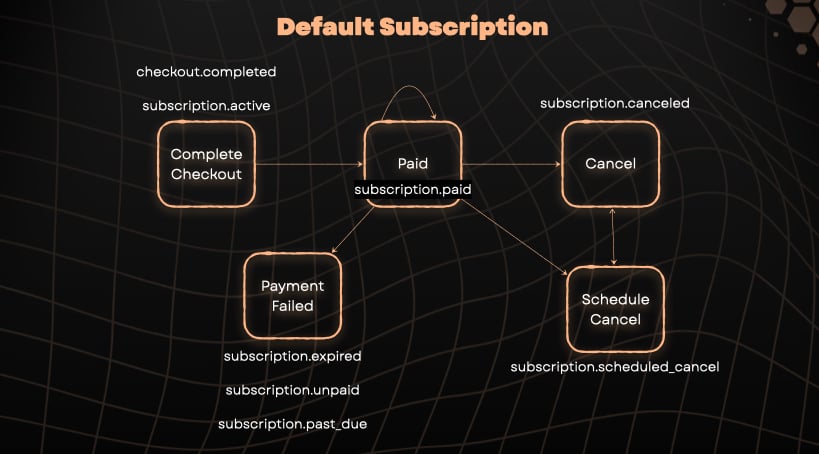
To help you understand the various subscription lifecycle scenarios, including relevant states and the webhook events triggered at each stage, see the diagrams below:
### Default Subscription Lifecycle
This diagram shows a standard subscription flow from checkout to cancellation, including payment failures and cancellations:
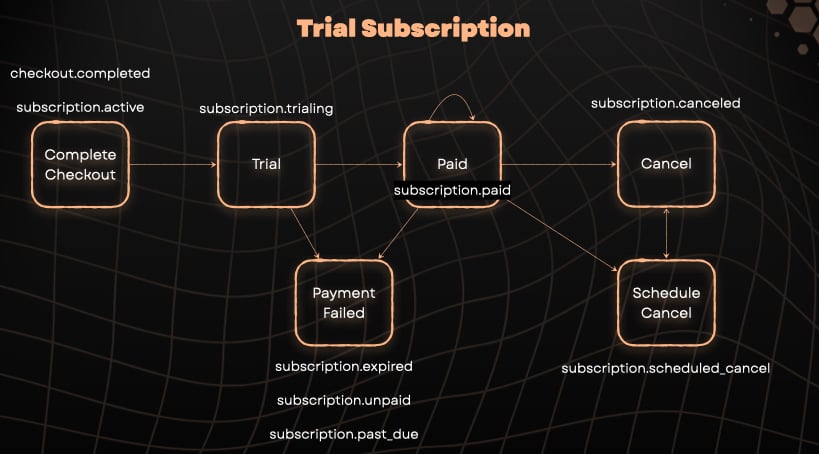
### Trial Subscription Lifecycle
This diagram shows how subscriptions with free trials work, from checkout through the trial period to paid billing:
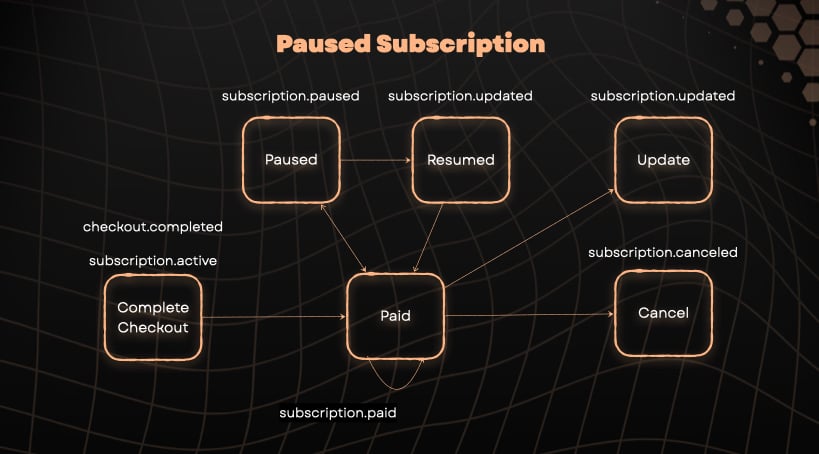
### Paused Subscription Lifecycle
This diagram shows how subscriptions can be paused and resumed, including updates during the active period:
### Subscription Status
A subscription can be in different states throughout its lifecycle:
* **Active:** The subscription is current and payments are being processed normally.
* **Canceled:** The subscription has been terminated and will not renew or bill again.
* **Unpaid:** Payment for the subscription has failed or is overdue; access may be restricted until payment is made.
* **Incomplete:** Customer must complete payment within 23 hours to activate, or payment requires action (e.g., authentication). Also applies to pending payments with processing status.
* **Paused:** The subscription is temporarily paused (no charges are processed and billing is on hold).
* **Trialing:** The subscription is in a trial period before the first payment is collected.
* **Scheduled Cancel:** The subscription is scheduled to cancel at the end of the current billing period but is still active until then.
### Billing Cycles
Subscriptions operate on billing cycles that determine when payments are collected:
* **Monthly billing** - Charged every month
* **3 month billing** - Charged every 3 months
* **6 month billing** - Charged every 6 months
* **Yearly billing** - Charged annually
## Creating a Subscription
To create a subscription:
1. Create a subscription product in your Creem dashboard (set billing type to "recurring")
2. Generate a checkout session for the subscription
3. Direct your customer to the checkout URL
```tsx theme={null}
"use client"; // Optional: Works with server components
import { CreemCheckout } from "@creem_io/nextjs";
export function SubscribeButton() {
return (
);
}
```
Learn more about the Next.js adapter and advanced features.
```typescript theme={null}
import { Creem } from "creem";
const creem = new Creem({
apiKey: process.env.CREEM_API_KEY!,
server: process.env.NODE_ENV === "production" ? "prod" : "test",
});
// Create a subscription checkout session
const checkout = await creem.checkouts.create({
productId: "prod_YOUR_SUBSCRIPTION_ID",
successUrl: "https://yoursite.com/success",
customer: {
email: "customer@example.com", // Optional: Pre-fill email
},
metadata: {
userId: "user_123",
source: "web",
},
});
// Redirect to the checkout URL
console.log(checkout.checkoutUrl);
```
View the full SDK API reference and advanced usage examples.
```typescript theme={null}
"use client";
import { authClient } from "@/lib/auth-client";
export function SubscribeButton({ productId }: { productId: string }) {
const handleCheckout = async () => {
const { data, error } = await authClient.creem.createCheckout({
productId,
successUrl: "/dashboard",
});
if (data?.url) {
window.location.href = data.url;
}
};
return (
);
}
```
The Better Auth integration automatically syncs the authenticated user's email and tracks
subscription status in your database.
Learn about database persistence and automatic user synchronization.
If you're in test mode, use `https://test-api.creem.io` instead of `https://api.creem.io`. Learn
more about [Test Mode](/getting-started/test-mode).
```bash theme={null}
curl -X POST https://api.creem.io/v1/checkouts \
-H "x-api-key: YOUR_API_KEY" \
-H "Content-Type: application/json" \
-d '{
"product_id": "prod_YOUR_SUBSCRIPTION_ID",
"success_url": "https://yoursite.com/success",
"customer": {
"email": "customer@example.com"
}
}'
```
### Response
```json theme={null}
{
"id": "ch_1QyIQDw9cbFWdA1ry5Qc6I",
"checkout_url": "https://checkout.creem.io/ch_1QyIQDw9cbFWdA1ry5Qc6I",
"product_id": "prod_YOUR_SUBSCRIPTION_ID",
"status": "pending"
}
```
View the complete endpoint documentation with all available parameters.
## Handling Successful Subscriptions
After a successful subscription creation, users are redirected to your `success_url` with subscription details as query parameters:
```
https://yoursite.com/success?checkout_id=ch_xxx&subscription_id=sub_xxx&customer_id=cust_xxx&product_id=prod_xxx
```
| Query parameter | Description |
| ----------------- | ------------------------------------------------------------------------------ |
| `checkout_id` | The ID of the checkout session created for this subscription. |
| `subscription_id` | The ID of the subscription created. |
| `customer_id` | The customer ID associated with this subscription. |
| `product_id` | The product ID that the subscription is for. |
| `request_id` | Optional. The request/reference ID you provided when creating this checkout. |
| `signature` | All previous parameters signed by Creem using your API-key, verifiable by you. |
See [Verifying Redirect Signatures](/features/checkout/checkout-api#verifying-redirect-signatures)
for code examples on how to validate the signature. Remember that null values (like `order_id` for
subscription checkouts) are **excluded** from the signature string.
For production applications, we recommend using [Webhooks](/code/webhooks) to handle subscription
events like renewals, cancellations, and payment failures.
## Managing Subscription Access
Use webhooks to grant and revoke access based on subscription status. The Next.js and Better Auth adapters provide high-level `onGrantAccess` and `onRevokeAccess` callbacks. With the TypeScript SDK, verify the webhook payload and handle the subscription event types directly.
### How It Works
* **Grant access** when subscription events indicate the customer should have access, such as `subscription.active`, `subscription.trialing`, or `subscription.paid`.
* **Revoke access** when subscription events indicate the customer should lose access, such as `subscription.paused` or `subscription.expired`.
The adapters can group these events into callbacks for you. In a generic TypeScript endpoint, keep the event mapping explicit so your application owns the access policy.
```typescript theme={null}
// app/api/webhook/creem/route.ts
import { Webhook } from "@creem_io/nextjs";
export const POST = Webhook({
webhookSecret: process.env.CREEM_WEBHOOK_SECRET!,
onGrantAccess: async ({ customer, metadata, reason, product }) => {
// Grant access when subscription becomes active/trialing/paid
const userId = metadata?.referenceId as string;
await db.user.update({
where: { id: userId },
data: {
subscriptionActive: true,
subscriptionTier: product.name,
},
});
console.log(`Granted access to ${customer.email} - Reason: ${reason}`);
},
onRevokeAccess: async ({ customer, metadata, reason }) => {
// Revoke access when subscription is paused/expired
const userId = metadata?.referenceId as string;
await db.user.update({
where: { id: userId },
data: { subscriptionActive: false },
});
console.log(`Revoked access from ${customer.email} - Reason: ${reason}`);
},
});
```
Learn more about webhook handling and server functions.
```typescript theme={null}
import { constructWebhookEventEntity } from "creem/webhooks";
// In your webhook endpoint
export async function handleWebhook(request: Request) {
try {
const rawBody = await request.text();
const event = await constructWebhookEventEntity(rawBody, request.headers, {
secret: process.env.CREEM_WEBHOOK_SECRET!,
});
switch (event.eventType) {
case "subscription.active":
case "subscription.trialing":
case "subscription.paid": {
const subscription = event.object;
const userId = subscription.metadata?.userId;
if (!userId) return new Response("No user metadata", { status: 200 });
await db.user.update({
where: { id: userId },
data: {
subscriptionActive: true,
subscriptionId: subscription.id,
},
});
console.log(`Granted access for subscription ${subscription.id}`);
break;
}
case "subscription.paused":
case "subscription.expired": {
const subscription = event.object;
const userId = subscription.metadata?.userId;
if (!userId) return new Response("No user metadata", { status: 200 });
await db.user.update({
where: { id: userId },
data: { subscriptionActive: false },
});
console.log(`Revoked access for subscription ${subscription.id}`);
break;
}
}
return new Response("OK", { status: 200 });
} catch (error) {
return new Response("Invalid signature", { status: 400 });
}
}
```
View the complete webhook API and all available events.
```typescript theme={null}
// lib/auth.ts
import { betterAuth } from "better-auth";
import { creem } from "@creem_io/better-auth";
export const auth = betterAuth({
database: {
// your database config
},
plugins: [
creem({
apiKey: process.env.CREEM_API_KEY!,
webhookSecret: process.env.CREEM_WEBHOOK_SECRET!,
onGrantAccess: async ({ reason, product, customer, metadata }) => {
const userId = metadata?.referenceId as string;
// Grant access in your database
await db.user.update({
where: { id: userId },
data: {
hasAccess: true,
subscriptionTier: product.name,
},
});
console.log(`Granted access to ${customer.email}`);
},
onRevokeAccess: async ({ reason, product, customer, metadata }) => {
const userId = metadata?.referenceId as string;
// Revoke access in your database
await db.user.update({
where: { id: userId },
data: {
hasAccess: false,
},
});
console.log(`Revoked access from ${customer.email}`);
},
}),
],
});
```
With Better Auth, subscription data is automatically persisted to your database and synced via
webhooks.
Learn about automatic trial abuse prevention and database persistence.
If you're not using any of our SDKs, you can still implement the same logic by listening to specific webhook events:
```typescript theme={null}
// app/api/webhook/route.ts
import crypto from "crypto";
async function verifySignature(payload: string, signature: string) {
const computed = crypto
.createHmac("sha256", process.env.CREEM_WEBHOOK_SECRET!)
.update(payload)
.digest("hex");
return computed === signature;
}
app.post("/webhook", async (req, res) => {
const signature = req.headers["creem-signature"];
const payload = JSON.stringify(req.body);
if (!verifySignature(payload, signature)) {
return res.status(401).send("Invalid signature");
}
const { eventType, object } = req.body;
// Grant access events
if (["subscription.active", "subscription.trialing", "subscription.paid"].includes(eventType)) {
const userId = object.metadata?.referenceId;
const customer = object.customer;
const product = object.product;
await db.user.update({
where: { id: userId },
data: {
subscriptionActive: true,
subscriptionTier: product.name,
},
});
console.log(`Granted access to ${customer.email}`);
}
// Revoke access events
if (["subscription.paused", "subscription.expired"].includes(eventType)) {
const userId = object.metadata?.referenceId;
const customer = object.customer;
await db.user.update({
where: { id: userId },
data: { subscriptionActive: false },
});
console.log(`Revoked access from ${customer.email}`);
}
res.status(200).send("OK");
});
```
View all webhook events and learn about signature verification.
If you want to remove access when your customer cancels the subscription (even though the billing
period might still be active), you should listen to the `subscription.canceled` event.
## Key Features
Learn how to set up trial periods for your subscriptions.
Implement per-seat pricing for team-based products.
Enable self-service subscription management.
Create discount codes for subscriptions
Learn how to update, upgrade, and manage active subscriptions
Handle subscription cancellations and process refunds
 ### Trial Subscription Lifecycle
This diagram shows how subscriptions with free trials work, from checkout through the trial period to paid billing:
### Trial Subscription Lifecycle
This diagram shows how subscriptions with free trials work, from checkout through the trial period to paid billing:
 ### Paused Subscription Lifecycle
This diagram shows how subscriptions can be paused and resumed, including updates during the active period:
### Paused Subscription Lifecycle
This diagram shows how subscriptions can be paused and resumed, including updates during the active period:
 ### Subscription Status
A subscription can be in different states throughout its lifecycle:
* **Active:** The subscription is current and payments are being processed normally.
* **Canceled:** The subscription has been terminated and will not renew or bill again.
* **Unpaid:** Payment for the subscription has failed or is overdue; access may be restricted until payment is made.
* **Incomplete:** Customer must complete payment within 23 hours to activate, or payment requires action (e.g., authentication). Also applies to pending payments with processing status.
* **Paused:** The subscription is temporarily paused (no charges are processed and billing is on hold).
* **Trialing:** The subscription is in a trial period before the first payment is collected.
* **Scheduled Cancel:** The subscription is scheduled to cancel at the end of the current billing period but is still active until then.
### Billing Cycles
Subscriptions operate on billing cycles that determine when payments are collected:
* **Monthly billing** - Charged every month
* **3 month billing** - Charged every 3 months
* **6 month billing** - Charged every 6 months
* **Yearly billing** - Charged annually
## Creating a Subscription
To create a subscription:
1. Create a subscription product in your Creem dashboard (set billing type to "recurring")
2. Generate a checkout session for the subscription
3. Direct your customer to the checkout URL
### Subscription Status
A subscription can be in different states throughout its lifecycle:
* **Active:** The subscription is current and payments are being processed normally.
* **Canceled:** The subscription has been terminated and will not renew or bill again.
* **Unpaid:** Payment for the subscription has failed or is overdue; access may be restricted until payment is made.
* **Incomplete:** Customer must complete payment within 23 hours to activate, or payment requires action (e.g., authentication). Also applies to pending payments with processing status.
* **Paused:** The subscription is temporarily paused (no charges are processed and billing is on hold).
* **Trialing:** The subscription is in a trial period before the first payment is collected.
* **Scheduled Cancel:** The subscription is scheduled to cancel at the end of the current billing period but is still active until then.
### Billing Cycles
Subscriptions operate on billing cycles that determine when payments are collected:
* **Monthly billing** - Charged every month
* **3 month billing** - Charged every 3 months
* **6 month billing** - Charged every 6 months
* **Yearly billing** - Charged annually
## Creating a Subscription
To create a subscription:
1. Create a subscription product in your Creem dashboard (set billing type to "recurring")
2. Generate a checkout session for the subscription
3. Direct your customer to the checkout URL