> ## Documentation Index
> Fetch the complete documentation index at: https://docs.creem.io/llms.txt
> Use this file to discover all available pages before exploring further.
# Embedded Checkout
> Embed Creem checkout directly in your site — as a modal overlay or inline — without redirecting customers away.
Embedded checkout runs the entire Creem payment flow **inside your own site** instead of sending customers to a hosted page. Drop in a small script, open checkout as a modal or inline iframe, and get a callback when payment completes.
## How it works
1. Create a **checkout session** on your server with your secret API key (see [Checkout API](/features/checkout/checkout-api)) and read its `checkoutUrl`.
2. Load the Creem embed script on your page.
3. Open the checkout as an overlay or inline, and handle `onComplete`.
You create the session server-side (secret key) and pass the resulting URL to the browser — the URL is safe to expose, and completion is always confirmed server-side via webhook.
## 1. Create a checkout session (server-side)
Every embed needs a **checkout URL**, created on your server with your secret API key so the price and product can't be tampered with. Use the [Checkout API](/features/checkout/checkout-api) or one of its SDKs and read `checkoutUrl` (the raw REST API returns it as `checkout_url`):
```ts theme={null}
// Server-side only — keep CREEM_API_KEY secret
import { createCreem } from 'creem_io';
const creem = createCreem({ apiKey: process.env.CREEM_API_KEY! });
const checkout = await creem.checkouts.create({
productId: 'prod_YOUR_PRODUCT_ID',
successUrl: 'https://yoursite.com/success', // optional
});
// `checkoutUrl` is typed as optional in the SDK — assert (or guard) it:
const checkoutUrl = checkout.checkoutUrl!;
// Send `checkoutUrl` to the browser, then embed it (below).
```
Then embed that URL with **a framework SDK**, the **script loader**, or a **raw iframe** — pick one.
## 2. Choose an embed path
Use exactly **one** of the three paths below — framework SDKs, the script loader, or a raw iframe.
### Framework SDKs
First-class packages for **React (≥18), Vue (≥3), and Svelte (≥4)** with typed props and lifecycle events. They share a framework-agnostic core, [`@creem_io/embed`](https://www.npmjs.com/package/@creem_io/embed), which you can also use directly in vanilla JS.
```bash npm theme={null}
npm install @creem_io/react
```
```bash yarn theme={null}
yarn add @creem_io/react
```
```bash pnpm theme={null}
pnpm add @creem_io/react
```
```bash bun theme={null}
bun add @creem_io/react
```
```tsx theme={null}
import { CreemCheckout, CreemCheckoutInline } from '@creem_io/react';
// Overlay — wrap any clickable element
console.log('paid', d)}>
// Inline — mount in place
```
Also available: the `useCreemCheckout()` hook and the `CreemEmbedCheckout.create()` promise API. [Full reference →](https://www.npmjs.com/package/@creem_io/react)
```bash npm theme={null}
npm install @creem_io/vue
```
```bash yarn theme={null}
yarn add @creem_io/vue
```
```bash pnpm theme={null}
pnpm add @creem_io/vue
```
```bash bun theme={null}
bun add @creem_io/vue
```
```vue theme={null}
```
Also available: the `useCreemCheckout()` composable and `CreemEmbedCheckout.create()`. [Full reference →](https://www.npmjs.com/package/@creem_io/vue)
```bash npm theme={null}
npm install @creem_io/svelte
```
```bash yarn theme={null}
yarn add @creem_io/svelte
```
```bash pnpm theme={null}
pnpm add @creem_io/svelte
```
```bash bun theme={null}
bun add @creem_io/svelte
```
```svelte theme={null}
```
Low-level: the `{@attach}` attachments (Svelte 5.29+) or `use:` actions (Svelte 4). [Full reference →](https://www.npmjs.com/package/@creem_io/svelte)
Every SDK takes the same options as the loader below (`theme`, `locale`) and emits the same `ready` + `completed` events.
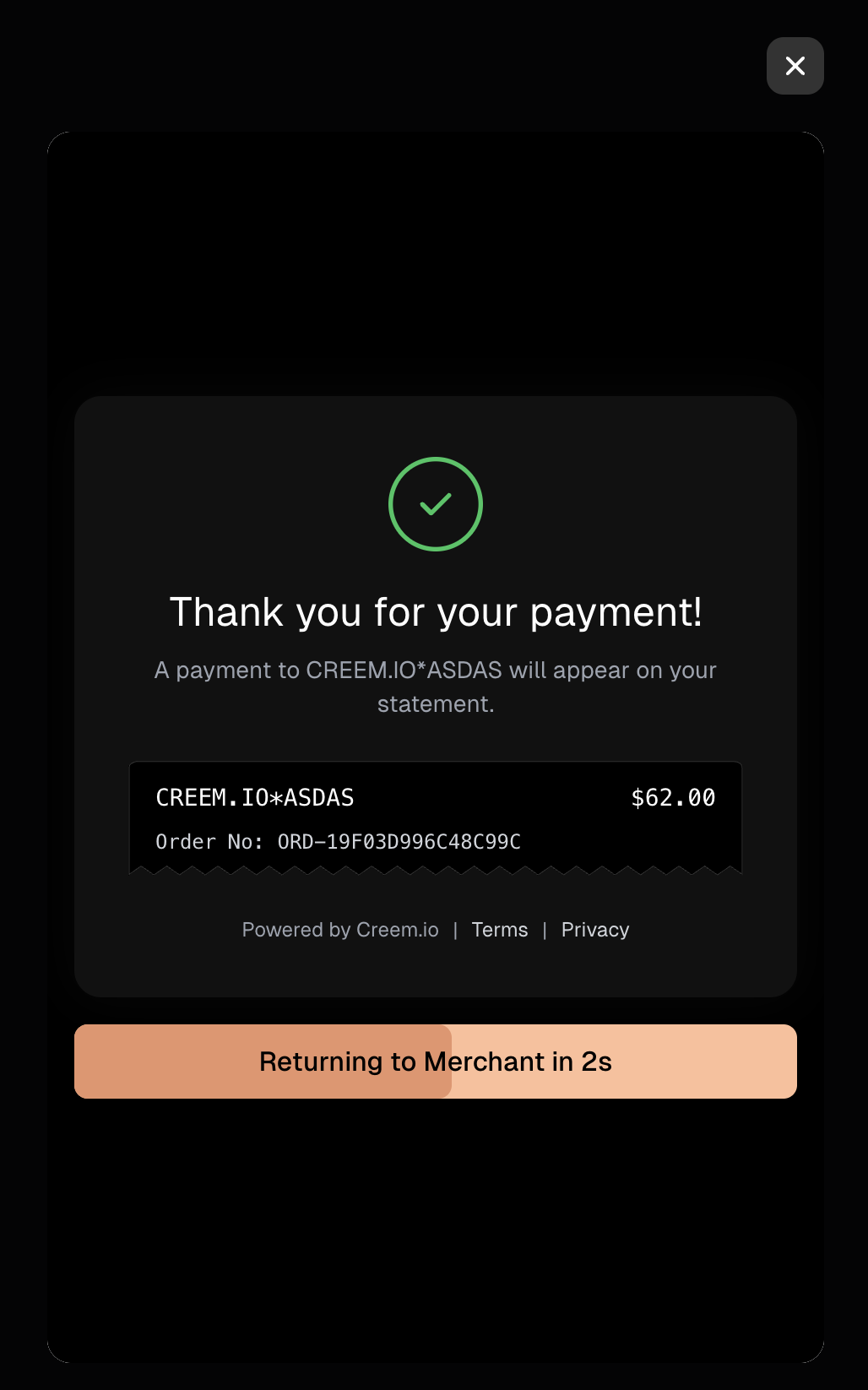
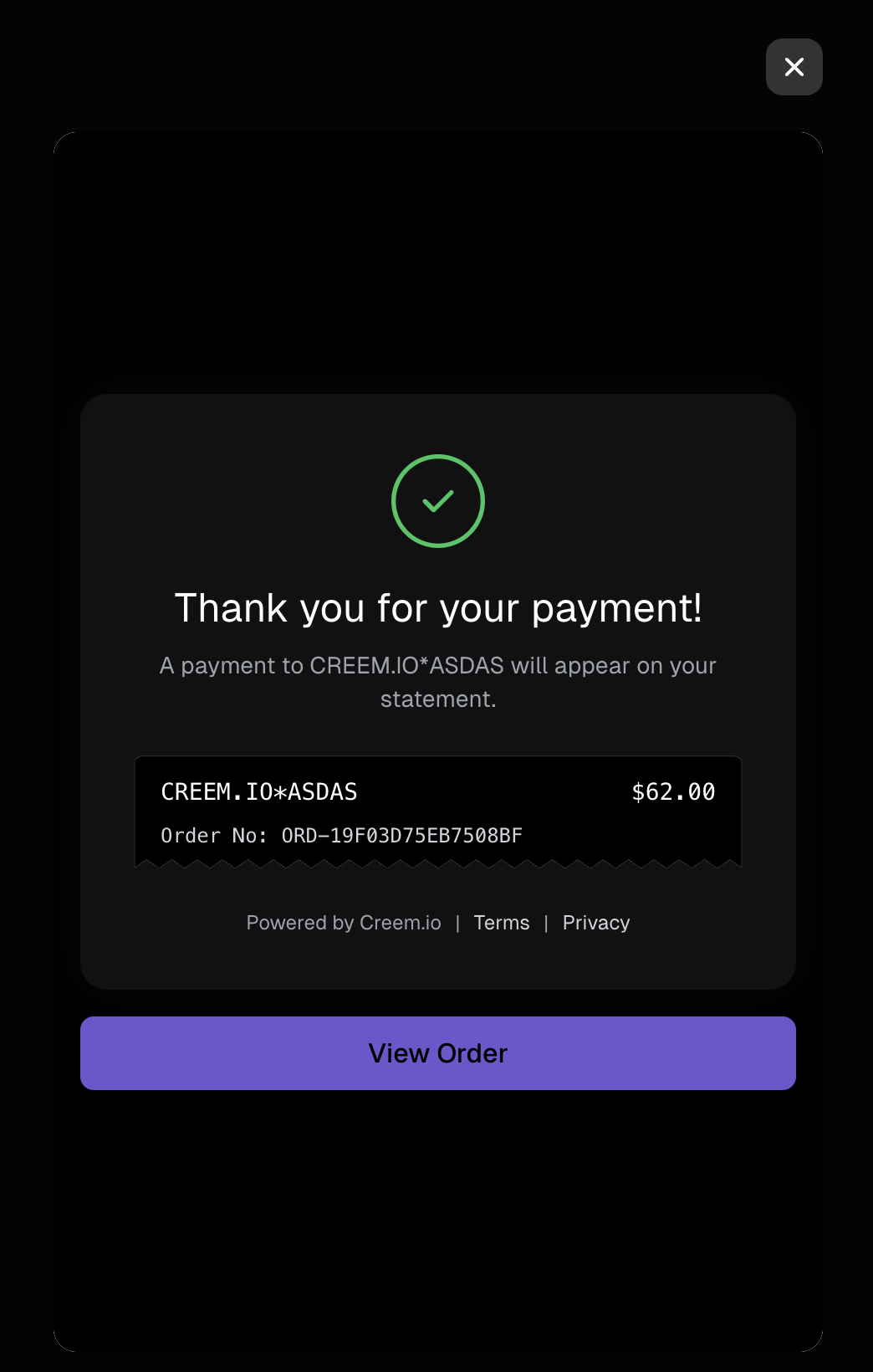
On completion the embed behaves exactly like the hosted checkout's return page:
* **Product has a Return URL** → a short confirmation screen, then the top window navigates there (\~3s).
* **No Return URL** → a "View order" button; the embed stays open until the customer closes it.
To keep customers fully inline, call `close()` inside `onComplete` — it dismisses the embed **and cancels the pending redirect**. Cancelling the redirect from `close()` requires `@creem_io/embed` ≥ 0.3.3 (or `@creem_io/react` / `/vue` / `/svelte` ≥ 0.2.3); on older versions `close()` dismisses the modal but the redirect still fires.
#### Open on click (dynamic sessions)
The components above need the `checkoutUrl` at render time. For a **pricing grid** — many products, where you don't want to pre-create a session for each one on page load — create the session **on demand** and open it imperatively with the `useCreemCheckout()` hook:
```tsx theme={null}
import { useCreemCheckout } from '@creem_io/react';
function BuyButton({ productId }: { productId: string }) {
const openCheckout = useCreemCheckout();
async function buy() {
// Create the session on YOUR server (keeps the secret key off the client),
// then open the returned URL — no need to pre-create sessions on load.
const res = await fetch('/api/checkout', {
method: 'POST',
body: JSON.stringify({ productId }),
});
const { checkoutUrl } = await res.json();
openCheckout({ checkoutUrl, onComplete: (detail) => console.log('paid', detail) });
}
return ;
}
```
Vue exposes the same `useCreemCheckout()` composable. In vanilla JS (or any framework), use the promise-based `CreemEmbedCheckout.create({ checkoutUrl })`, which resolves once the checkout has rendered.
### Script loader
For non-framework apps, or when you want a global `Creem` object. No build step — drop in the loader script and open checkout from any framework or plain HTML.
#### Overlay
```html theme={null}
```
```html theme={null}
```
The overlay shows the confirmation screen on success; call `Creem.close()` from `onComplete` to dismiss it — this also **cancels the pending redirect** to the Return URL, keeping the customer on your page.
#### Inline
Mount checkout inside a container on your page:
```html theme={null}
```
**`onComplete` is UX-only.** It fires in the browser and can be spoofed — use it to close the modal or show a success state. Grant entitlements / fulfil orders from your **[webhook handler](/code/webhooks)** (verified server-side), never from `onComplete`.
#### Declarative data attributes
Any element with `data-creem-checkout` opens the overlay on click — no JS wiring, but it still relies on the loader script above:
```html theme={null}
Buy now
```
Optionally set the theme and language with `data-creem-theme` and `data-creem-locale`:
```html theme={null}
Buy now
```
### Raw iframe
The lowest-level option — no loader, no SDK. Use it when you only need inline display and will handle the lifecycle yourself, or don't need callbacks:
```html theme={null}
```
The `allow="payment *; publickey-credentials-get *"` attribute is required — without it, digital wallets, passkeys, and 3-D Secure challenges can't run inside the iframe. (The framework SDKs and the script loader set this for you.)
## Presentation — theme & language
Works with the framework SDKs and the script loader. `openCheckout` and `mount` accept two presentation options, appended to the checkout URL for you:
```js theme={null}
Creem.openCheckout({
checkoutUrl: 'CHECKOUT_URL',
theme: 'dark', // 'light' | 'dark'
locale: 'pt-BR', // BCP47 tag — forces the checkout language
});
```
By default the checkout follows the customer's **browser language**. Pass `locale` to force a specific one (e.g. to match your own site's language). Unsupported locales fall back to English. See the [supported languages](/features/checkout/checkout-api) for the full list.
## Affiliate attribution
If you run the Creem [Affiliate Program](/features/affiliate-program), embedded checkout still credits referred sales to the right affiliate — and the SDKs and script loader handle it for you. Here's what happens, and the one edge case worth knowing.
**How it works**
* An affiliate link (`creem.io/affiliate?code=…`) sends the visitor to your site and appends a `creem_ref` token to the landing URL.
* On the **hosted** checkout, attribution rides a first-party cookie on Creem's domain — nothing to do.
* Inside the **embed**, the checkout runs in a cross-site iframe, so the browser doesn't send that cookie there — in any browser. Attribution instead rides the token: the SDK/loader reads `creem_ref` from your page, **persists it in your site's own first-party storage**, and forwards it into the checkout iframe, so it works uniformly everywhere. No code needed for the common case.
`creem_ref` is an **opaque, signed token** — it identifies the click, not the affiliate. Don't try to parse an affiliate code out of it, and you don't need to read or forward it yourself: the SDKs and loader do it automatically. (It mirrors `client_reference_id` in Stripe-based tools like Rewardful and Tolt.)
**Edge case: separate landing and checkout pages**
The token arrives on whatever page the affiliate link points to. The SDK captures it automatically when it runs on that page. But if a visitor lands on `/?creem_ref=…`, then **navigates** to another page (say `/pricing`) before opening checkout, and your app drops the query string on that navigation, the token is no longer on the URL. If it wasn't captured before that navigation, attribution is lost — in every browser, since the embed relies on the token, not the cookie.
To cover this, call `captureAffiliateRef()` once early in your app (e.g. a root layout) so the token is captured on the landing page and stored for later:
```tsx theme={null}
// Root layout / top-level component — runs on every page
'use client';
import { useEffect } from 'react';
import { captureAffiliateRef } from '@creem_io/react'; // also in /vue, /svelte, /embed
export function AffiliateRefCapture() {
useEffect(() => { captureAffiliateRef(); }, []);
return null;
}
```
The **script loader** (`creem.io/embed.js`) captures the token automatically on every page it loads on — so if you include the `
 ## How it works
1. Create a **checkout session** on your server with your secret API key (see [Checkout API](/features/checkout/checkout-api)) and read its `checkoutUrl`.
2. Load the Creem embed script on your page.
3. Open the checkout as an overlay or inline, and handle `onComplete`.
## How it works
1. Create a **checkout session** on your server with your secret API key (see [Checkout API](/features/checkout/checkout-api)) and read its `checkoutUrl`.
2. Load the Creem embed script on your page.
3. Open the checkout as an overlay or inline, and handle `onComplete`.
 #### Open on click (dynamic sessions)
The components above need the `checkoutUrl` at render time. For a **pricing grid** — many products, where you don't want to pre-create a session for each one on page load — create the session **on demand** and open it imperatively with the `useCreemCheckout()` hook:
```tsx theme={null}
import { useCreemCheckout } from '@creem_io/react';
function BuyButton({ productId }: { productId: string }) {
const openCheckout = useCreemCheckout();
async function buy() {
// Create the session on YOUR server (keeps the secret key off the client),
// then open the returned URL — no need to pre-create sessions on load.
const res = await fetch('/api/checkout', {
method: 'POST',
body: JSON.stringify({ productId }),
});
const { checkoutUrl } = await res.json();
openCheckout({ checkoutUrl, onComplete: (detail) => console.log('paid', detail) });
}
return ;
}
```
Vue exposes the same `useCreemCheckout()` composable. In vanilla JS (or any framework), use the promise-based `CreemEmbedCheckout.create({ checkoutUrl })`, which resolves once the checkout has rendered.
### Script loader
For non-framework apps, or when you want a global `Creem` object. No build step — drop in the loader script and open checkout from any framework or plain HTML.
#### Overlay
#### Open on click (dynamic sessions)
The components above need the `checkoutUrl` at render time. For a **pricing grid** — many products, where you don't want to pre-create a session for each one on page load — create the session **on demand** and open it imperatively with the `useCreemCheckout()` hook:
```tsx theme={null}
import { useCreemCheckout } from '@creem_io/react';
function BuyButton({ productId }: { productId: string }) {
const openCheckout = useCreemCheckout();
async function buy() {
// Create the session on YOUR server (keeps the secret key off the client),
// then open the returned URL — no need to pre-create sessions on load.
const res = await fetch('/api/checkout', {
method: 'POST',
body: JSON.stringify({ productId }),
});
const { checkoutUrl } = await res.json();
openCheckout({ checkoutUrl, onComplete: (detail) => console.log('paid', detail) });
}
return ;
}
```
Vue exposes the same `useCreemCheckout()` composable. In vanilla JS (or any framework), use the promise-based `CreemEmbedCheckout.create({ checkoutUrl })`, which resolves once the checkout has rendered.
### Script loader
For non-framework apps, or when you want a global `Creem` object. No build step — drop in the loader script and open checkout from any framework or plain HTML.
#### Overlay