> ## Documentation Index
> Fetch the complete documentation index at: https://docs.creem.io/llms.txt
> Use this file to discover all available pages before exploring further.
# Private Notes
> Display private notes for users after they complete a purchase of your product."
# Private Notes with Creem
Welcome to Creem's Private Notes documentation! This feature allows you to seamlessly include private notes that are automatically shared with customers after their purchase.
## Getting Started
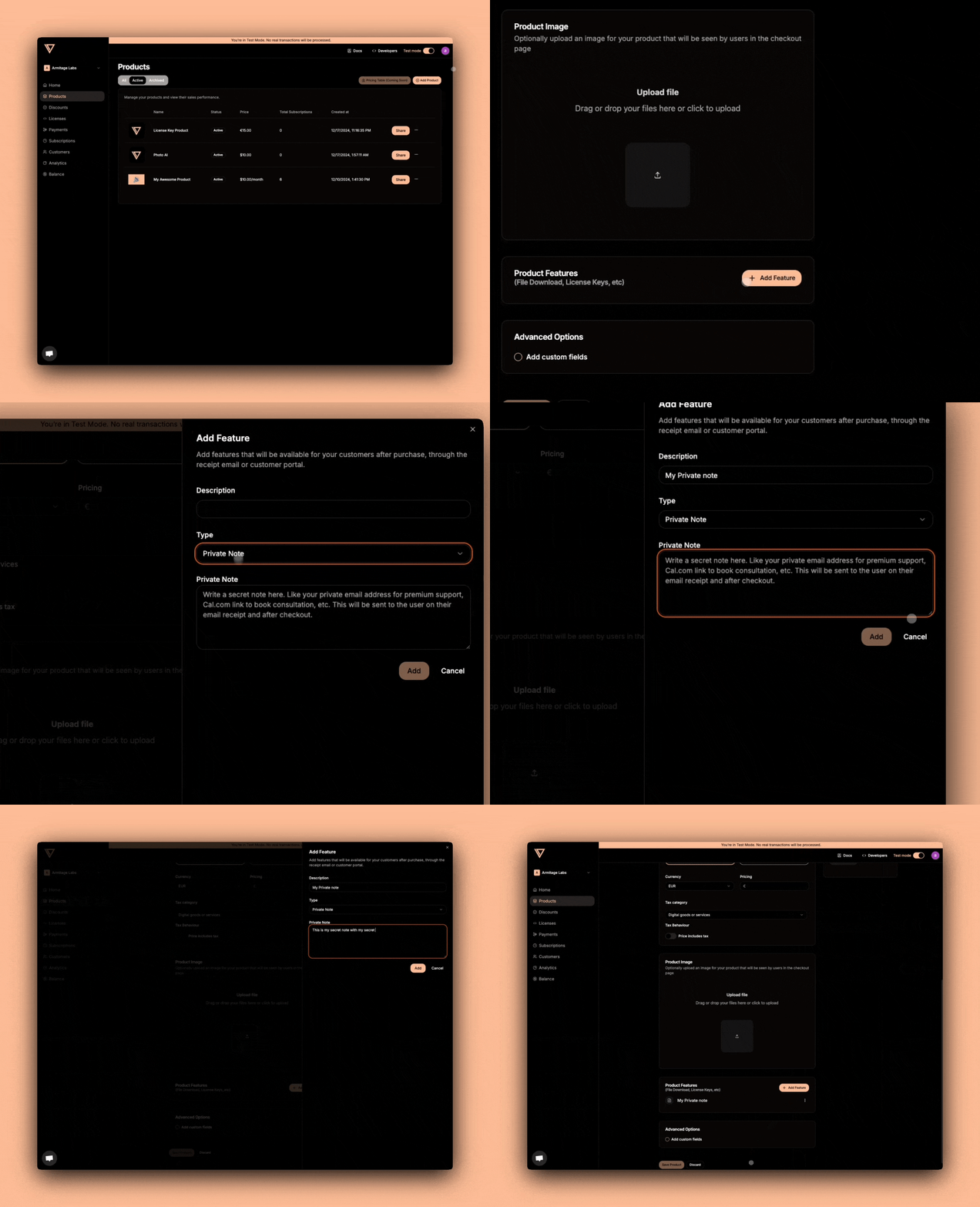
Setting up private notes for your product is straightforward and requires minimal configuration:
1. Navigate to Your Product Settings
* Log into your Creem Dashboard
* Go to "Products" section
* Create a new product
* Enable "Private Notes" feature
2. Configure Your Private Note
* Enter the note content that customers will receive
* Save your configuration
## How It Works
Once configured, the private note system works automatically. When a customer completes a purchase, they'll receive your private note in multiple locations:
* **Email Receipt:** The private note appears in the purchase confirmation email
* **Customer Portal:** Customers can access the note anytime through their portal
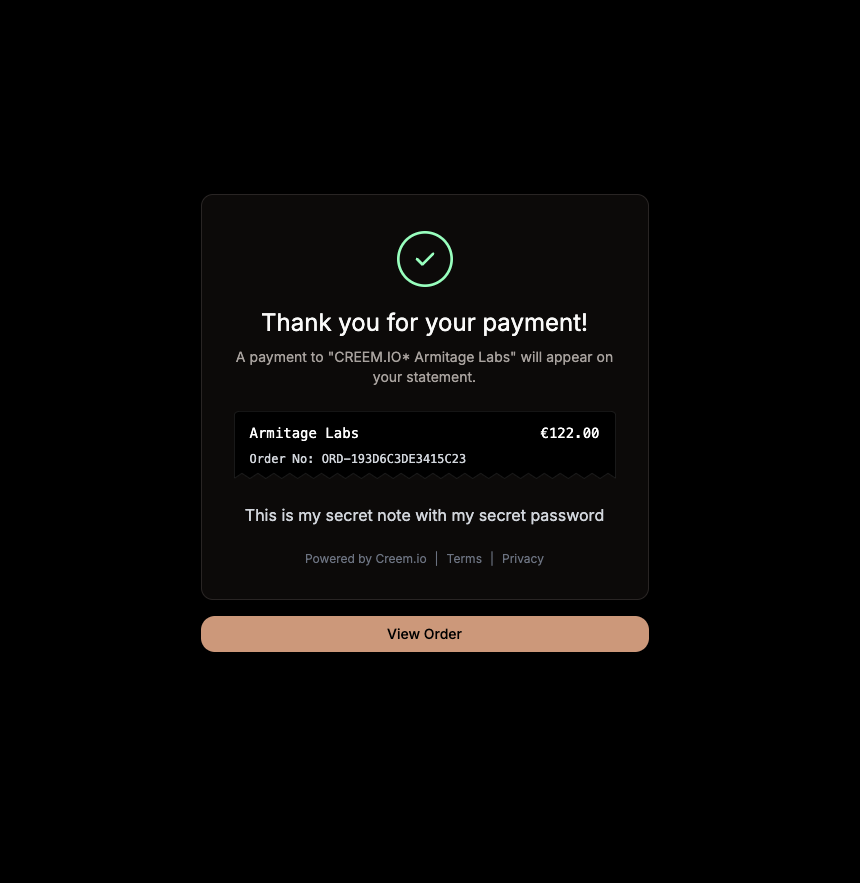
* **Order Confirmation Page:** The note is displayed immediately after purchase (when no redirect URL is set)
## Best Practices
* Keep notes clear and concise
* Include relevant information for post-purchase actions
* Consider adding support contact information
* Use different notes as needed for different product versions
**Pro Tips**
* Use formatting to highlight important information
* Include next steps if applicable
* Consider different customer scenarios when writing your note
## Common Use Cases
* **Service Purchases:** Share onboarding information or next steps
* **Course Access:** Provide login credentials or access instructions
* **Digital Content:** Password to spreadsheets
* **Premium Customer Support:** Contact numbers, emails or other channels
 2. Configure Your Private Note
* Enter the note content that customers will receive
* Save your configuration
## How It Works
Once configured, the private note system works automatically. When a customer completes a purchase, they'll receive your private note in multiple locations:
* **Email Receipt:** The private note appears in the purchase confirmation email
2. Configure Your Private Note
* Enter the note content that customers will receive
* Save your configuration
## How It Works
Once configured, the private note system works automatically. When a customer completes a purchase, they'll receive your private note in multiple locations:
* **Email Receipt:** The private note appears in the purchase confirmation email
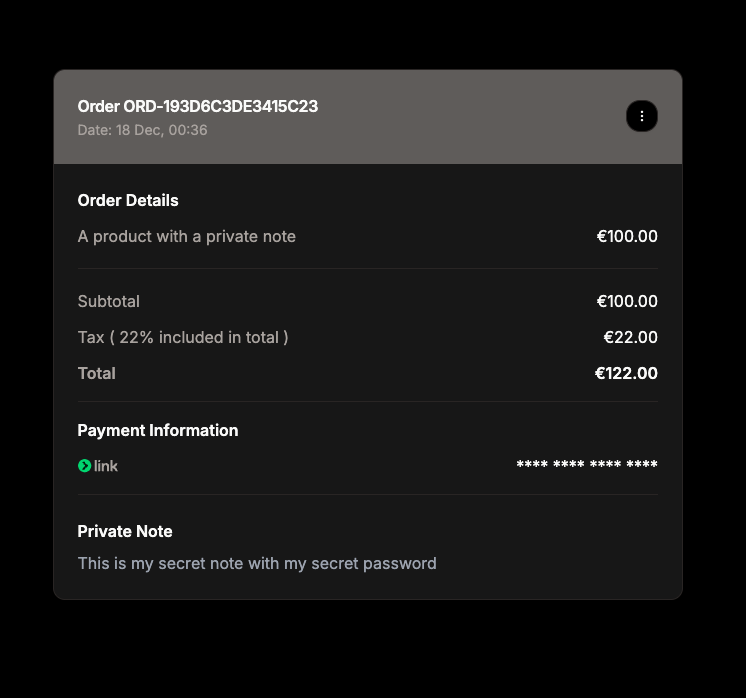 * **Customer Portal:** Customers can access the note anytime through their portal
 ## Best Practices
* Keep notes clear and concise
* Include relevant information for post-purchase actions
* Consider adding support contact information
* Use different notes as needed for different product versions
**Pro Tips**
* Use formatting to highlight important information
* Include next steps if applicable
* Consider different customer scenarios when writing your note
## Common Use Cases
* **Service Purchases:** Share onboarding information or next steps
* **Course Access:** Provide login credentials or access instructions
* **Digital Content:** Password to spreadsheets
* **Premium Customer Support:** Contact numbers, emails or other channels
## Best Practices
* Keep notes clear and concise
* Include relevant information for post-purchase actions
* Consider adding support contact information
* Use different notes as needed for different product versions
**Pro Tips**
* Use formatting to highlight important information
* Include next steps if applicable
* Consider different customer scenarios when writing your note
## Common Use Cases
* **Service Purchases:** Share onboarding information or next steps
* **Course Access:** Provide login credentials or access instructions
* **Digital Content:** Password to spreadsheets
* **Premium Customer Support:** Contact numbers, emails or other channels