> ## Documentation Index
> Fetch the complete documentation index at: https://docs.creem.io/llms.txt
> Use this file to discover all available pages before exploring further.
# File Downloads
> Allow customers to download protected files after product purchase."
# File Downloads with Creem
Welcome to Creem's File Downloads documentation! This feature enables you to easily distribute digital files to customers after their purchase through our secure customer portal.
 ## Getting Started
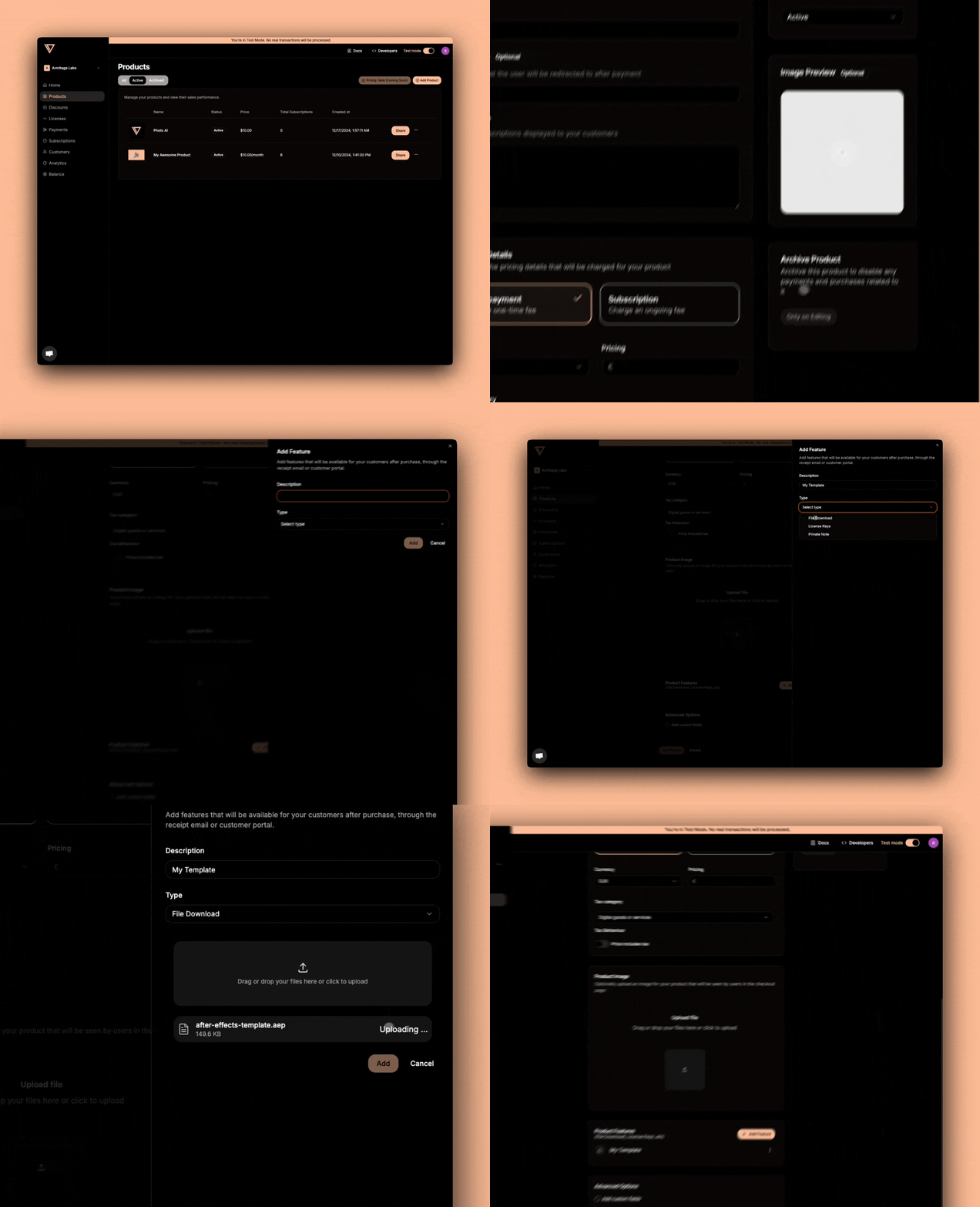
Setting up file downloads for your product is straightforward and requires minimal configuration:
1. Navigate to Your Product Settings
* Log into your Creem Dashboard
* Go to "Products" section
* Create a new product
* Enable "File Downloads" feature
2. Configure Your File Download
* Upload your digital file(s)
* Save your configuration
## How It Works
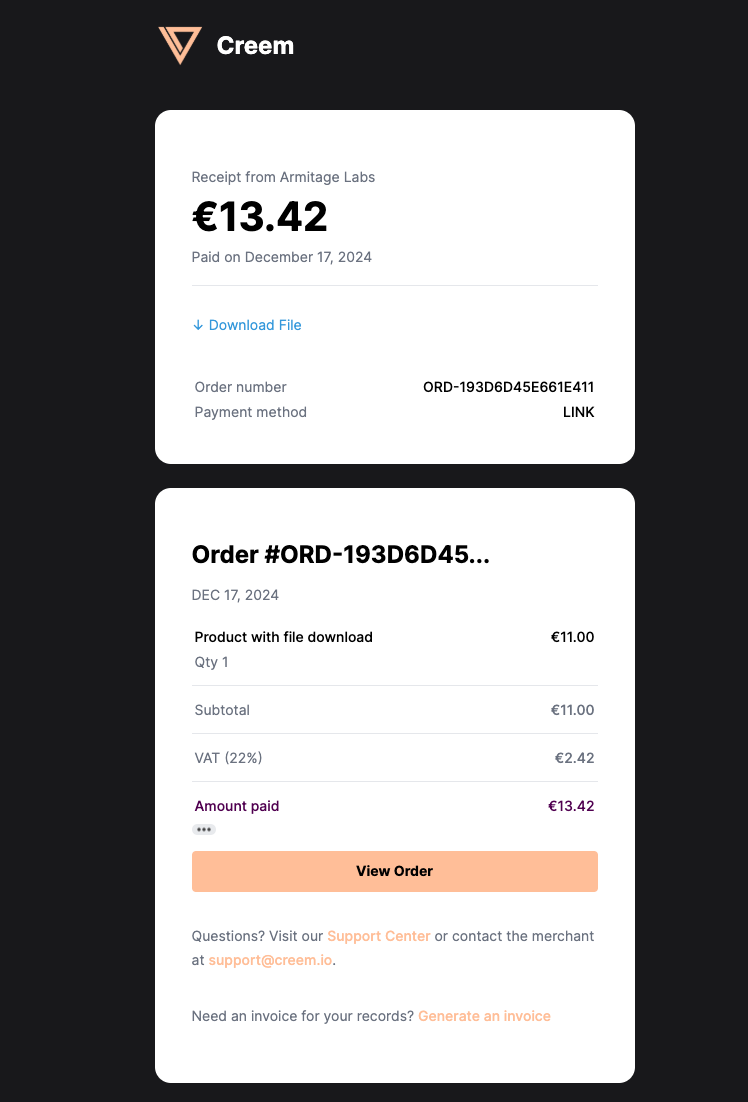
Once configured, the file download system works automatically. When a customer completes a purchase, they'll receive access to your files in multiple locations:
* **Email Receipt:** A secure download link appears in the purchase confirmation email that will lead the user to the customer portal
## Getting Started
Setting up file downloads for your product is straightforward and requires minimal configuration:
1. Navigate to Your Product Settings
* Log into your Creem Dashboard
* Go to "Products" section
* Create a new product
* Enable "File Downloads" feature
2. Configure Your File Download
* Upload your digital file(s)
* Save your configuration
## How It Works
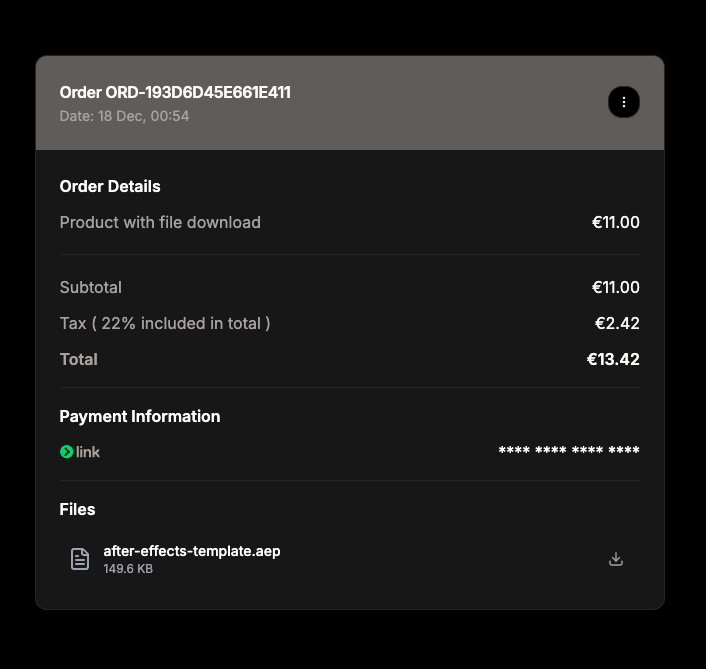
Once configured, the file download system works automatically. When a customer completes a purchase, they'll receive access to your files in multiple locations:
* **Email Receipt:** A secure download link appears in the purchase confirmation email that will lead the user to the customer portal
 * **Customer Portal:** Customers can download files anytime through their portal
 ## Best Practices
* Organize files with clear, descriptive names
* Compress large files when possible
* Include readme files for installation or usage instructions
* Regularly verify file integrity
**Pro Tips**
* Consider providing multiple file formats when relevant
* Include version numbers in file names if applicable
## Common Use Cases
* **Digital Products:** eBooks, music, videos, or software
* **Documentation:** User manuals, guides, or specifications
* **Resources:** Templates, assets, or tools
* **Educational Content:** Course materials or supplementary resources
## Security Features
Creem's file download system implements several security measures:
* Secure, expiring download links
* Protected file storage
* Download attempt monitoring
* Automated abuse prevention
**Need Help?**
Our support team is ready to assist you with setting up file downloads. [Contact us](https://www.creem.io/contact)
## Best Practices
* Organize files with clear, descriptive names
* Compress large files when possible
* Include readme files for installation or usage instructions
* Regularly verify file integrity
**Pro Tips**
* Consider providing multiple file formats when relevant
* Include version numbers in file names if applicable
## Common Use Cases
* **Digital Products:** eBooks, music, videos, or software
* **Documentation:** User manuals, guides, or specifications
* **Resources:** Templates, assets, or tools
* **Educational Content:** Course materials or supplementary resources
## Security Features
Creem's file download system implements several security measures:
* Secure, expiring download links
* Protected file storage
* Download attempt monitoring
* Automated abuse prevention
**Need Help?**
Our support team is ready to assist you with setting up file downloads. [Contact us](https://www.creem.io/contact)