> ## Documentation Index
> Fetch the complete documentation index at: https://docs.creem.io/llms.txt
> Use this file to discover all available pages before exploring further.
# One-Time Products & Credits
> Sell owned products, consumables, and credit packs with the Creem Convex component, including refund-safe credit grants.
One-time products, consumables, and credit packs.
Examples on this page are fragments. They render inside the provider you mounted
in the [Quickstart](/code/sdks/convex/quickstart):
```svelte theme={null}
```
If something below does not work, one of these is usually missing. Each links
straight to the step that sets it up.
* [Component registered](/code/sdks/convex/quickstart#register-component) — `app.use(creem)` in `convex/convex.config.ts`
* [Secrets set](/code/sdks/convex/quickstart#set-secrets) — `CREEM_API_KEY` and `CREEM_WEBHOOK_SECRET` in Convex env
* [Billing API exported](/code/sdks/convex/quickstart#export-billing-api) — `convex/billing.ts` calling `creem.api({ resolve })`
* [Webhook registered](/code/sdks/convex/quickstart#register-webhook) — `creem.registerRoutes(http)` in `convex/http.ts`
* [Products created](/code/sdks/convex/quickstart#create-products) — one Creem product per plan and billing cycle
* [Products synced](/code/sdks/convex/quickstart#sync-products) — `npx convex run billing:syncBillingProducts`
* [Styles imported](/code/sdks/convex/quickstart#import-styles) — `@creem_io/convex/styles` after the Tailwind import
* [Catalog defined](/code/sdks/convex/quickstart#define-plans) — `billingCatalog` mapping plan IDs to product IDs
* [Provider mounted](/code/sdks/convex/quickstart#render-pricing-page) — `` around your billing UI
## Single owned product
A product purchased once. The card shows "Owned" afterwards and suppresses repeat checkout:
```tsx title="Pricing page" theme={null}
```
## Repeating products (consumables)
`type="recurring"` allows repeat purchases and never shows an "Owned" badge. Use it for credit packs and other consumables:
```tsx title="Pricing page" theme={null}
```
## Credit grants
Credit fulfillment happens in the webhook, on the server. The purchase-to-credit mapping therefore has to live in a server-owned catalog, not in client code. Pass it to the `Creem` constructor in `convex/billing.ts`:
```ts title="convex/billing.ts" theme={null}
const serverBillingCatalog = defineBillingCatalog({
version: "server",
plans: [
{
planId: "ai-credits-100",
category: "paid",
billingType: "onetime",
creemProductIds: { custom: process.env.CREEM_ONETIME_CREDITS! },
creditGrant: {
amount: "100",
accountName: "credits",
unitLabel: "credits",
refundBehavior: "revoke_on_full_refund",
},
},
],
} as const);
export const creem = new Creem(components.creem, {
billingCatalog: serverBillingCatalog,
});
```
Set the trusted product ID in Convex env (never read it from a browser-exposed variable for fulfillment):
```bash theme={null}
npx convex env set CREEM_ONETIME_CREDITS prod_...
```
When a `checkout.completed` webhook arrives for that product, the component grants the credits.
### Refund behavior
`creditGrant.refundBehavior` answers one question. What happens to granted credits when the product is refunded?
| Value | Full refund | Partial refund | Use when |
| ----------------------------------- | ------------ | -------------------------- | ----------------------------------------------- |
| `"revoke_on_full_refund"` (default) | Revokes all | Revokes nothing | A purchase is only undone when fully refunded |
| `"prorate"` | Revokes all | Revokes proportional share | The product is clearly divisible (credit packs) |
| `"debit"` | Revokes all | Revokes all | Any refund should invalidate the whole grant |
| `"none"` | Revokes none | Revokes none | Your app handles refund reversals manually |
## Displaying and spending credits
`Credits.Root` renders a default balance card, or you can compose the slots yourself. Spending credits belongs in your own Convex action. The widget only displays and refreshes the balance:
```ts title="convex/billing.ts" theme={null}
// App-owned spend action
export const generateImage = action({
args: { requestId: v.string() },
returns: v.object({ creditsConsumed: v.string() }),
handler: async (ctx, args) => {
const identity = await resolve(ctx);
if (!identity) throw new ConvexError("Not authenticated");
await creem.credits.debitForEntity(ctx, {
entityId: identity.entityId,
amount: "10",
reference: "generate_image",
// A stable key per logical operation.
idempotencyKey: `generate_image_${args.requestId}`,
});
return { creditsConsumed: "10" };
},
});
```
```tsx title="src/CreditsPanel.tsx" theme={null}
{(credits) => (
<>
)}
```
```svelte title="src/routes/+page.svelte" theme={null}
{#snippet children(credits)}
{/snippet}
```
The widget needs only `credits.getBalance` in your connected API:
```ts theme={null}
const connectedApi: ConnectedBillingApi = {
// Other widget capabilities...
credits: { getBalance: api.billing.creditsGetBalance },
};
```
Keep the spend amount, reference, and idempotency policy in the app-owned backend action. UI code
can be manipulated; the action is the enforcement point.
## Mutually exclusive products & upgrade paths
When one-time products supersede each other (Basic license → Premium license), declare `transition` rules on the root. Once the user owns a lower tier, only valid upgrade paths render:
```tsx title="Pricing page" theme={null}
```
Two transition kinds:
* **`via_product`** checks out a dedicated upgrade product, so the customer pays only the difference.
* **`direct`** checks out the target product at full price.
**Handled in your frontend today.** Transition rules are declared on `Product.Root` and applied by
the widget. One effect worth knowing: a checkout started outside the widget sells the target
product at full price, since the grouping lives in your app rather than in Creem. Prefer this
handled by Creem directly? Vote for [grouping non-subscription
products](https://creem.featurebase.app/p/group-non-subscription-products-and-expose-via-creem-api).
## What to keep in mind
* `type="one-time"` is ownable, `type="recurring"` is repeatable. Choose per product. Both can live in the same `Product.Root`.
* Subscription checkouts also create Creem orders, but the billing snapshot only exposes one-time orders as owned access. See [Concepts](/code/sdks/convex/concepts#the-billing-state-model).
* Full `Product.Root` / `Product.Item` prop tables live in the [Reference](/code/sdks/convex/reference#component-reference).

 The widget needs only `credits.getBalance` in your connected API:
```ts theme={null}
const connectedApi: ConnectedBillingApi = {
// Other widget capabilities...
credits: { getBalance: api.billing.creditsGetBalance },
};
```
The widget needs only `credits.getBalance` in your connected API:
```ts theme={null}
const connectedApi: ConnectedBillingApi = {
// Other widget capabilities...
credits: { getBalance: api.billing.creditsGetBalance },
};
```
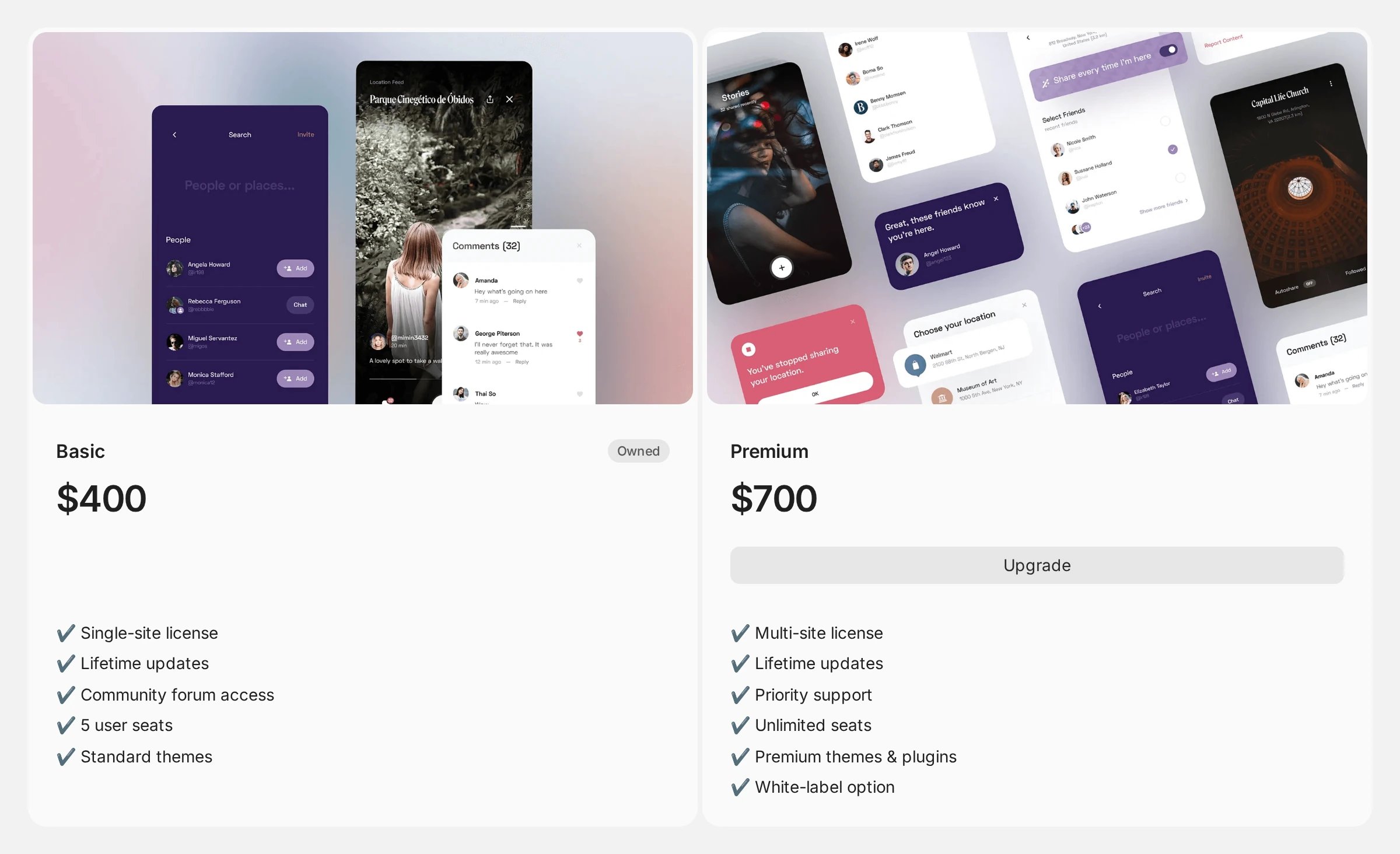
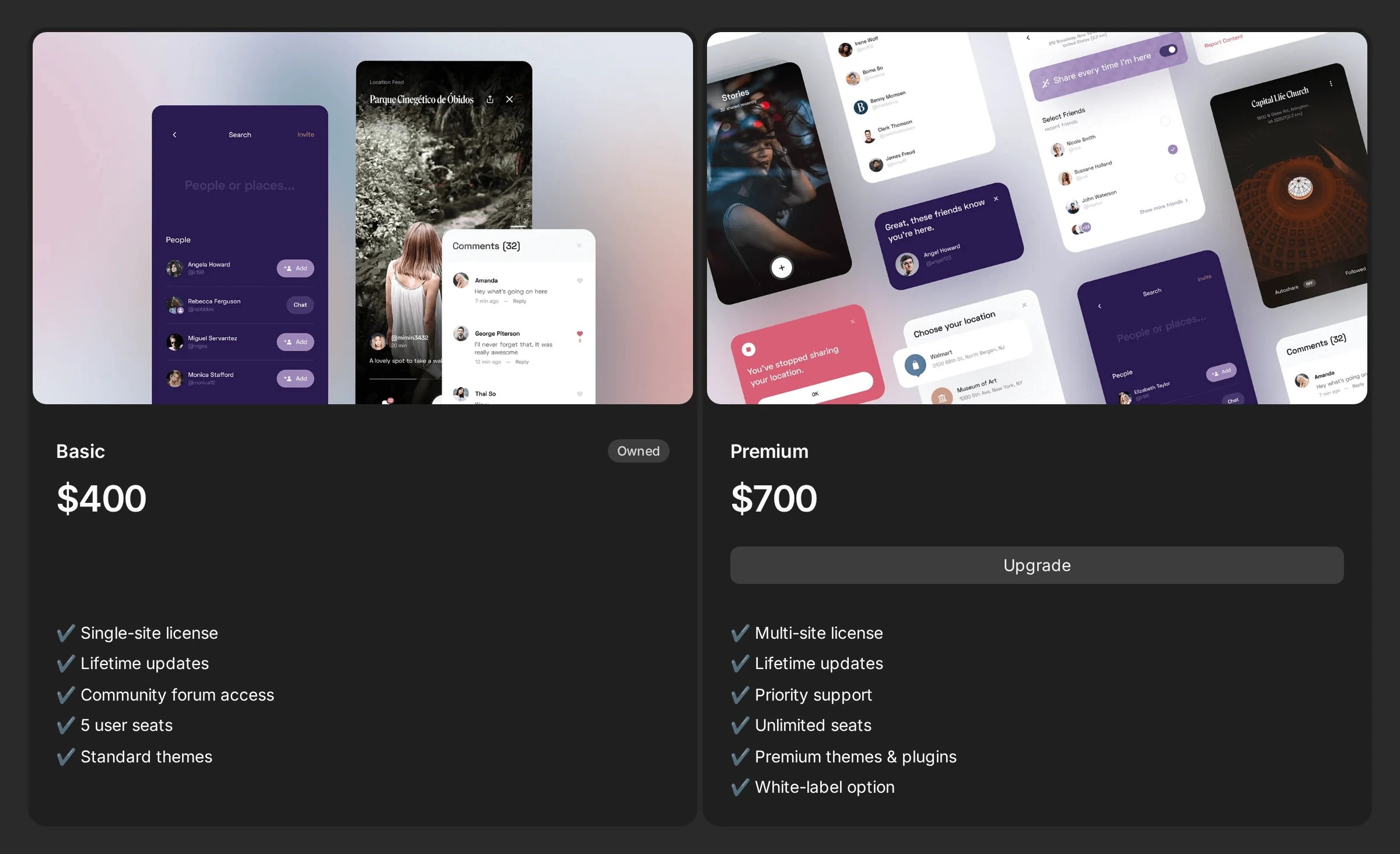 Two transition kinds:
* **`via_product`** checks out a dedicated upgrade product, so the customer pays only the difference.
* **`direct`** checks out the target product at full price.
Two transition kinds:
* **`via_product`** checks out a dedicated upgrade product, so the customer pays only the difference.
* **`direct`** checks out the target product at full price.